
A pricing page has one job: make the right choice obvious in under ten seconds. Start by matching layout to offer complexity, not by picking a template you like. Two or three straightforward plans call for cards; complicated feature sets call for a comparison table; usage-based pricing calls for a calculator. Check tier count and CTA visibility first, and the rest of the page falls into place.
TL;DR:
- Limit pricing plans to three or four, each serving a distinct buyer type, to avoid overwhelming customers with unnecessary comparisons.
- Use clear labels for pricing units and include savings highlights like monthly or annual toggles to simplify decision-making.
- Opt for layouts aligned with offer complexity: cards for simple plans, comparison tables for feature sets, and calculators for usage-based pricing.
- Ensure the pricing page is mobile-friendly by stacking cards vertically and collapsing tables, with real text prices for accessibility and SEO.
- Show scoped service packages with transparent boundaries for service businesses, avoiding fake flat rates and using qualification forms to generate leads.
Table of Contents
- Best Practices That Actually Raise Conversion Rates
- Which Pricing Page Layout Fits Your Offer?
- What Belongs On Every Pricing Page?
- Does Your Pricing Page Work on Mobile and for Screen Readers?
- Which Pricing Page Patterns Are Worth Copying?
- What Service Businesses Get Wrong About Pricing Pages
- Get Your Pricing Page Built and Tested by Webby Website Optimisation
- Sources
- FAQ
Best Practices That Actually Raise Conversion Rates
Good pricing page design starts with restraint. Cramming in five or six tiers to cover every edge case usually backfires because it forces the buyer to compare features instead of picking a need.
- Limit plans to three or four, and give each one a distinct reason to exist tied to a specific buyer type, not just a bigger number of features.
- Label price units clearly. “$49/month, billed annually” beats a bare number, and a monthly/annual toggle with a visible savings callout (like “save 20%”) removes the mental math for the buyer.
- Use one recommended badge and a clear CTA hierarchy, one primary button style, one secondary, so the eye knows where to land.
- Put social proof and ROI snippets near the CTA, not buried in a testimonials section three scrolls down.
- Keep plan copy tight. Benefit-driven bullets outperform feature lists almost every time.
- Measure everything. GA4 events, A/B tests, and heatmaps tell you which tier people hover over before they bounce.
Mobile traffic makes this non-negotiable. As of mid-2025, roughly 64% of web traffic was mobile, which means a pricing table that only works on a 27-inch monitor is failing most of the people who land on it. Design the phone view first, then scale up.
The underlying architecture behind all of this, anchor position, plan order, the comparison layout, the recommendation cue, matters more than any single visual tweak. A twelve-element framework for pricing-page conversion treats these structural choices as the real lever, with color and font way down the list.
Which Pricing Page Layout Fits Your Offer?
The layout decision comes down to how many meaningful differences exist between your plans and whether the final price depends on something the buyer controls.
- Cards work best for two to four plans with a clean, obvious upgrade path. Keep each card to four to six benefit bullets. More than that, and the card stops being scannable.
- Comparison tables earn their place when feature differences pile up or when a procurement team needs a checklist to justify the purchase internally. Collapse or hide the full table on mobile so it doesn’t turn into a horizontal-scroll nightmare.
- Calculators or sliders are required, not optional, when price scales with usage: seats, storage, transaction volume. Show a worked example (“For a team of 12, that’s $360/month”) right next to the slider so nobody has to do algebra to understand their own bill.
- Scoped service packages fit businesses selling custom work. Present two or three defined packages, then add a transparent “request a scope” CTA for anything bespoke, rather than inventing a fake flat rate for work that isn’t actually fixed.
Choosing the layout by offer complexity, not by aesthetic preference, is the single decision that determines whether the rest of the page even makes sense. Real-world SaaS pricing examples show this pattern holding across wildly different business models.
Pro Tip: Never mix pricing dimensions inside one card, monthly vs. annual, per-user vs. per-business, usage caps, setup fees. Put the unit right next to the price, and give usage-based plans a worked example instead of a raw formula.
What Belongs On Every Pricing Page?
Every effective pricing page shares a short list of non-negotiable components, regardless of industry or price point.
- A headline and subhead that name the customer the page is for, not a generic “Our Plans” label.
- Pricing cards with benefit bullets and CTAs aligned at the same vertical position across every tier.
- The billing unit, tax treatment, cancellation terms, and any annual discount stated plainly, not buried in fine print.
- A short FAQ, five questions max, answering buying objections rather than padding for search engines.
- Trust signals and case-study snippets placed near the CTA, where the buyer is actually deciding.
Best-practice checklists from Figma’s pricing page resource library back nearly every rule on this list, and the pattern holds whether you’re pricing software or a service package.
Does Your Pricing Page Work on Mobile and for Screen Readers?
Stack cards vertically on small screens and collapse long comparison tables into an accordion. Keep every price as real text, never an image, so screen readers and search engines can both find it.
- Provide visible keyboard focus states and aria labels on toggles and CTAs.
- Check color contrast against WCAG guidelines, not just against how it looks on your own monitor.
- Use a sticky mobile CTA, but keep it thin enough that it never covers the price or the plan name.
- Test on at least two real devices and run one screen-reader pass before launch.
Accessible, responsive pricing design means using semantic HTML elements like <details> and <summary> for collapsed tables instead of custom JavaScript that assistive tech can’t parse.
Pro Tip: If you can’t tab through your entire pricing page using only a keyboard, from toggle to CTA to FAQ, assume a meaningful slice of your visitors can’t use it either.
Which Pricing Page Patterns Are Worth Copying?
A handful of patterns show up again and again across high-converting pricing pages, and each one solves a specific problem.
- Simple three-card layout. Best for straightforward SaaS or subscription products. Copy the equal visual weight across all three cards; avoid the trap of making the cheap tier look punished by comparison.
- Persona tabs (e.g., “For Freelancers” / “For Teams”). Great when one product serves two very different buyers. The rule to copy: keep the tab switch instant, no page reload. The pitfall: don’t hide pricing behind a tab if most visitors only fit one persona.
- Usage calculator. Essential for metered pricing. Copy the worked-example pattern; avoid asking for more than two inputs before showing a number.
- Single offer plus add-ons. Works for service firms with one core deliverable. Copy the clear base-plus-extras structure; avoid vague add-on names like “Premium Support” with no scope attached.
- Enterprise or contact-sales flow. Use this to anchor perceived value, keeping the enterprise tier priced at roughly 2.5 to 4 times the middle tier so it reads as aspirational rather than absurd.
A curated gallery of real pricing page designs is worth a browse purely to see how these five patterns get executed across different industries before you commit to one.
What Service Businesses Get Wrong About Pricing Pages
Most feature-wall pricing tables were built for software, not for a plumber, a physio clinic, or a marketing shop. Service businesses lose leads when they either hide every number behind “contact us” or invent a fake flat rate for work that’s genuinely custom.
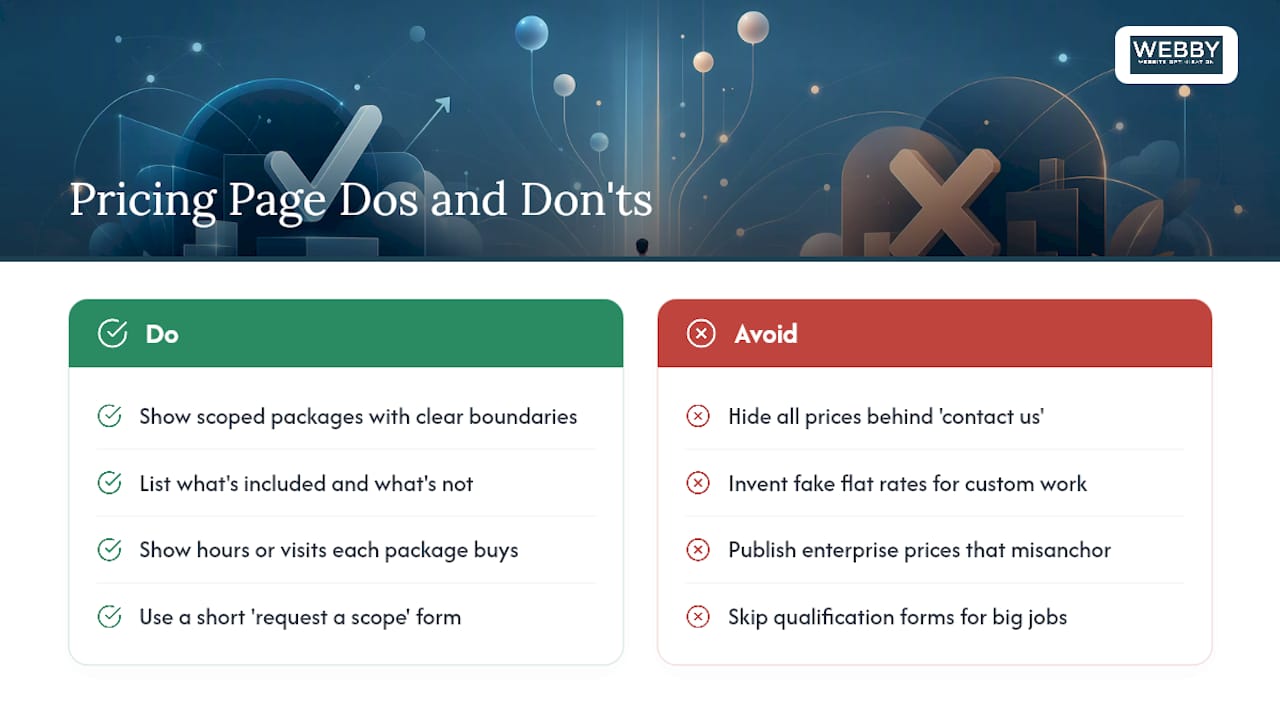
The better move is showing scoped packages with real boundaries, what’s included, what’s not, and how many hours or visits that buys, then routing anything bigger through a short qualification form attached to a “request a scope” CTA. That form does double duty: it reduces low-quality leads and gives you the information to quote fast instead of playing email tag for a week.
An enterprise number belongs on the page only if it genuinely anchors the buyer’s expectations. If it would just look absurd next to a modest local-service business, hide it behind a conversation instead.
Get Your Pricing Page Built and Tested by Webby Website Optimisation
Reading the rules is one thing. Rebuilding a pricing page around tier logic, mobile behavior, and CTA hierarchy while running your business is another. Webby Website Optimisation exists for exactly that gap: a local team that audits, designs, and tests pricing pages for service businesses instead of leaving you to guess at layout decisions alone.

A website audit for $1,250 (one-off) is the fastest way to find out whether your current pricing page is losing leads to a confusing layout, a missing CTA, or a mobile table nobody can read. For businesses that want the page rebuilt and iterated with real testing, the Business Website Optimisation Campaign covers ongoing conversion work for $3,125 (one-off), and Website Design & Development handles a full rebuild when the existing page needs more than a patch. Book a free audit consultation and find out which fix actually moves the needle before you spend another dollar guessing.
Sources
- 25 SaaS pricing page examples that make complex pricing clear | Stigg
- Web
- Pricing page best practices | Figma resource library
FAQ
What Is the Best Design for a Pricing Page?
The best design matches layout to offer complexity: cards for two to four simple plans, a comparison table for feature-heavy products, and a calculator when price depends on usage. Beyond layout, clear price labels, a recommendation badge, and social proof near the CTA consistently drive better results, per the twelve-element conversion framework.
How Do I Create a Pricing Page That Converts?
Start by deciding tier count (three or four is the sweet spot), then pick a layout pattern, cards, table, or calculator, that fits your offer’s complexity. Add a billing toggle, clear CTAs, a short FAQ, and trust signals near the buttons, then test with GA4 events and A/B tests to refine it over time.
How Much Should I Charge for Website Design?
Pricing depends heavily on scope, but Webby Website Optimisation lists a Website Built in a Day package at $750 one-off for businesses needing a fast, simple build. Larger projects, including full custom development, are quoted individually, so current details are available directly on the site.
What Is a Pricing Page?
A pricing page is the dedicated page on a website that lists a company’s plans, packages, or service tiers along with their costs, so a visitor can compare options and decide what to buy. It typically combines pricing tables or cards, feature comparisons, CTAs, and supporting trust signals like reviews or FAQs.
Should a Pricing Page Show an Enterprise Price?
Not always. An enterprise tier works as an anchor when it’s priced within a plausible range of the middle tier, roughly 2.5 to 4 times higher, but service businesses with highly custom enterprise work often do better routing that inquiry through a “contact us” or scoping form instead of a fixed number.