
Google is retiring call-only ads, and if your phone-lead campaigns still run on that format, you need to migrate to call assets on responsive search ads now. New call-only ads can no longer be created, existing ones stop showing entirely in 2027, and the fix is straightforward: add your phone numbers as call assets, let Google forwarding numbers track the results, and schedule everything around hours you can actually answer.
TL;DR:
- Existing call-only ads will stop showing in February 2027, requiring immediate migration to call assets attached to responsive search ads.
- Call assets support detailed call reporting with Google forwarding numbers, but manual setup of verification pages and proper formatting is essential for accurate tracking.
- Prioritize fixing operational issues like answer rate and staffing before optimizing ad copy or bidding strategies, as these have a greater impact on lead quality.
- Use separate campaigns or ad groups for different regions to improve targeting and write location-specific copy for higher call-through rates.
- Set call conversion thresholds at 30 to 60 seconds to filter out hang-ups and wrong-number calls, ensuring bidding focuses on qualified leads.
Table of Contents
- What Changed With Google Call Advertising, and Why It Matters Now
- Call-Only Ads vs. Call Assets vs. Call Campaigns vs. Local Services Ads
- How to Migrate From Call-Only Ads to Call Assets, Step by Step
- Getting More From Your Call Ads: Copy, Bidding, and Targeting
- Tracking Calls the Right Way: Duration, CRM Data, and Real Metrics
- Staffing and Call Routing: Where Most Wasted Ad Spend Actually Comes From
- Why Most Businesses Get the Migration Backwards
- How Webby Handles Call Ad Migrations for Local Businesses
- Where to Go Deeper on Call Ads and Related Setup
- Sources
- FAQ
What Changed With Google Call Advertising, and Why It Matters Now
Google confirmed a two-stage shutdown of call-only ads. As of February 2026, advertisers can no longer create new call-only ad campaigns. As of February 2027, existing call-only ads stop receiving impressions entirely, according to Google’s own support documentation. After that date, any campaign still built around the old call-only format simply goes dark.
For businesses that depend on phone leads (plumbers, dentists, locksmiths, HVAC contractors) this isn’t a minor product tweak. Call-only ads have been the backbone of “click to call” advertising for years. Losing them without a replacement plan means losing your top lead source overnight, not gradually.
The good news: Google isn’t removing the ability to run call ads campaigns. It’s consolidating the feature into call assets attached to responsive search ads, which do the same job with better reporting and more flexibility. The bad news: nothing migrates automatically. You have to make the switch yourself, and the accounts that wait until January 2027 to start will be scrambling against a hard deadline.
Here’s the immediate checklist to avoid a gap in your call volume:
- Audit every campaign in your account for call-only ad groups still active.
- Confirm which phone numbers are currently driving conversions worth preserving.
- Start building call assets on your responsive search ads before your budget is under pressure.
- Set a monitoring window of at least a few weeks to compare old versus new performance before you retire anything.
Accounts that treat this as a slow-motion transition, rather than a scramble in January 2027, keep their call volume intact. Accounts that don’t will find their best-performing ad group vanishing with zero warning the week it happens.
Call-Only Ads vs. Call Assets vs. Call Campaigns vs. Local Services Ads
These four formats get lumped together constantly, but they behave differently, and picking the wrong one wastes budget.
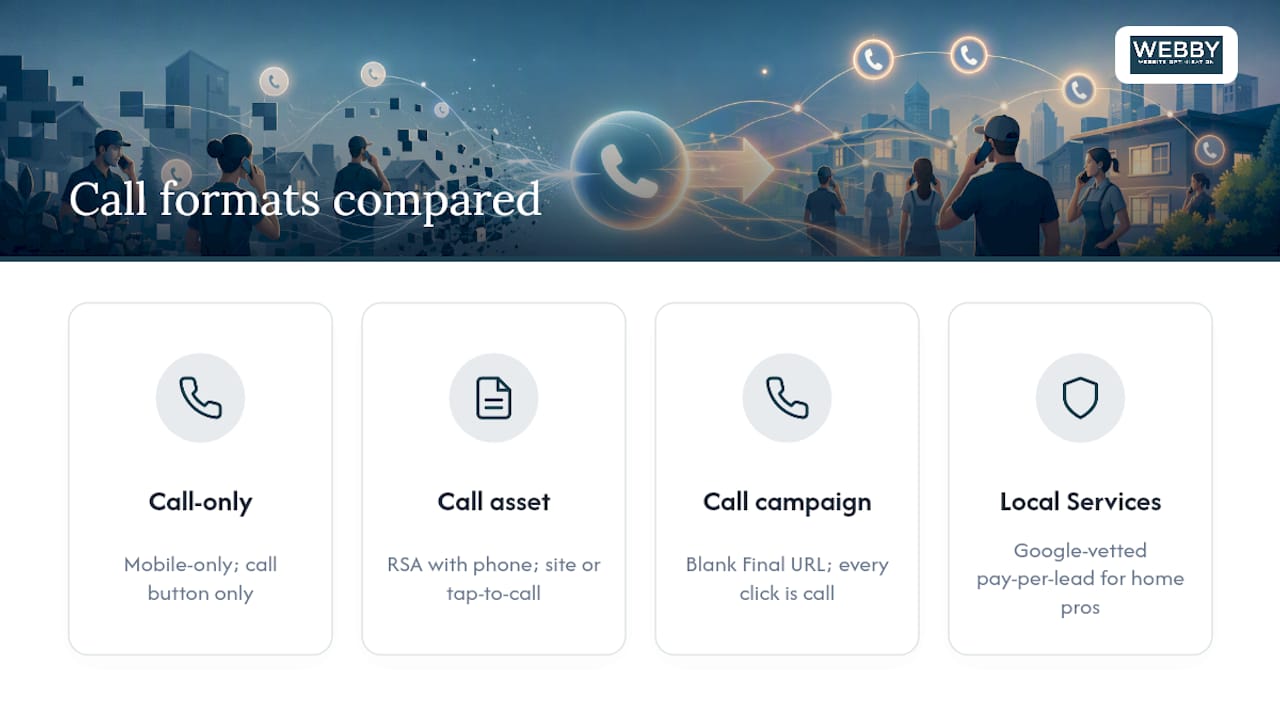
Call-only ads were mobile-only units where the entire ad existed to trigger a phone call. There was no landing page, no headline click to a website, just a number and a click-to-call button. That format is what’s being sunset.
Call assets attach a phone number to a standard responsive search ad. The searcher sees your regular ad copy and can either click through to your site or tap the number to call directly. According to Google’s documentation on call assets, a click on the call asset costs the same as a click on your headline, and it supports call reporting through Google forwarding numbers so you can track duration and outcomes.
Call campaigns are a separate campaign type where you leave the Final URL field blank, which forces every click to be a phone call rather than a website visit. Calls register under the Clicks column in reporting, and you need to segment by Click Type to separate call clicks from web clicks, per Google’s call campaign setup guide.
Local Services Ads are a different product entirely: Google-vetted, pay-per-lead listings that appear above standard search ads, typically for home services and professional categories with background-check requirements.
Which one fits your business depends on intent. If you want a website click to remain an option (useful for businesses that also sell online or want visitors to browse services first), call assets on RSAs are the better fit. If every single lead should be a phone call and nothing else, a dedicated call campaign with a blank Final URL keeps that intent clean. Local Services Ads suit categories where consumers already expect a vetted-provider badge, like electricians or movers.
How to Migrate From Call-Only Ads to Call Assets, Step by Step
Google’s own transition guidance lays out a clear sequence for this, and following it in order prevents the most common migration mistakes.
- Collect and format your phone numbers correctly. Use E.164 formatting (country code plus number, no spaces or dashes, like +61491570156) so Google’s system can validate them without a manual review delay.
- Set up a verification page. Google needs to confirm the number appears somewhere on your site, either your homepage or a dedicated contact page, before the call asset gets approved.
- Add your business name to the account, since Google’s migration checklist treats this as a prerequisite step before assets go live, as detailed in Google’s guide to transitioning from call ads.
- Create or edit your responsive search ads, then add call assets at the account, campaign, or ad group level depending on how granular you need tracking to be.
- Turn on call reporting during asset creation, choose your conversion action, and set a minimum call duration threshold rather than counting every connected call.
- Set your ad schedule to match your actual answering hours, not your posted business hours.
- Monitor the new RSAs for a test window before touching the old call-only ads. A 30 to 60 day observation period gives Smart Bidding time to settle, which is the window Google itself recommends before pausing anything.
- Pause, then remove, the old call-only ads once the RSAs are approved and performing at or above the baseline you were getting before.
Pro Tip: Don’t delete your old call-only ads the day your new call assets go live. Pause them instead and keep them dormant for two to three weeks. If your RSA call volume dips unexpectedly, you can flip the old ads back on as a stopgap while you troubleshoot.
The most common snags during this process: numbers get disapproved because of formatting errors (missing the plus sign, extra spaces), verification fails because the number isn’t visible on the linked page, or call assets don’t show because scheduling settings accidentally restrict them to zero hours. Check formatting first. It’s the fastest fix and the most frequent cause of a stalled migration.
Getting More From Your Call Ads: Copy, Bidding, and Targeting
Migrating the ad format is only half the job. Optimizing what you migrated to is where the real performance gains sit.
Ad copy for call-driven campaigns works best with a tight three-part structure inside Google’s character limits: a specific offer or service line, a trust signal (years in business, license number, review count), and a time-sensitive reason to call now rather than browse later. “Same-day plumbing repair, licensed and insured, call before 5pm for today’s slot” packs all three into one line.
Bidding strategy depends on how much conversion data you have. New campaigns with limited call volume tend to do better on Maximize Conversions while Smart Bidding learns your patterns. Once you’ve got a reliable stream of tracked, qualified calls, Target CPA lets you set a real cost ceiling per booked job rather than per click. Manual bidding still has a place for niche, low-volume categories where Smart Bidding doesn’t have enough signal to work with.
A few tactical levers worth using every time:
- Add callout assets highlighting things like “24/7 emergency service” or “free quotes” to pre-qualify the caller before they dial.
- Use structured snippets to list service categories, so someone searching for a specific repair doesn’t call expecting something you don’t offer.
- Add location assets so nearby searchers see your address and distance, which filters out callers outside your service area before they pick up the phone.
- Apply device bid modifiers favoring mobile, since call assets almost exclusively convert on phones, not desktops.
- Segment campaigns by geography so budget doesn’t bleed into areas your business can’t actually service.
Pro Tip: If you serve multiple suburbs or regions, run separate ad groups per area rather than one blanket geo-targeted campaign. It lets you write copy that names the actual neighborhood, which consistently outperforms generic “near you” language in call-through rate.
Tracking Calls the Right Way: Duration, CRM Data, and Real Metrics
The single biggest measurement mistake in call ads campaigns is counting every connected call as a conversion. A wrong-number dial, a five-second hang-up, and a fifteen-minute booked job all look identical to Smart Bidding if you don’t set a threshold, and that noise trains your bidding algorithm on the wrong signal.
Google forwarding numbers, built into call assets, are the simplest tracking option: no setup fee, no third-party integration, and duration data flows straight into Google Ads reporting. Third-party call-tracking platforms cost more and require integration work, but they typically offer deeper analytics, call recording, and easier CRM syncing for businesses running calls through multiple channels beyond just Google Ads.
Here’s the sequence for setting up tracking that actually reflects business outcomes:
- Enable call reporting when you create the call asset, so Google starts logging connect time automatically.
- Set a minimum call-duration threshold, commonly 30 to 60 seconds, since a call that short is rarely a real inquiry.
- Import offline conversions or CRM dispositions back into Google Ads so bidding eventually optimizes for booked jobs, not just answered calls.
- Review your call reports weekly for the first month after migration to catch tracking gaps before they skew a full reporting cycle.
Four numbers matter more than anything else in your dashboard: cost per answered call, answer rate (calls actually picked up versus calls placed), qualified-call rate (calls that match your service area and need), and cost per booked job. Clicks and impressions tell you almost nothing about whether the phone is ringing with the right kind of lead.
Counting conversions at the moment of connection, rather than after a duration threshold, trains your bidding on noise instead of signal. Fixing that one setting is often the single highest-leverage change available in an underperforming account.
Staffing and Call Routing: Where Most Wasted Ad Spend Actually Comes From
Ad copy and bidding get most of the attention, but the biggest ROI lever in call ads campaigns is almost always operational: whether someone actually picks up the phone.
Match your ad schedule to your real answer window, not your posted business hours. A landscaping company that lists “8am to 5pm” on its website but has the office phone forwarded to a mobile that goes to voicemail after 4:30pm is bleeding leads for the last half hour of every scheduled day. Pull your call logs, find your actual answer rate by hour, and set your ad schedule to match reality rather than the sign on the door.
Routing options scale with budget:
- A dedicated in-house customer service rep answering during business hours gives the highest-quality conversion, since they know the business and can book jobs on the spot.
- A third-party answering service covers gaps and after-hours calls at lower cost than staffing extra shifts, though quality depends heavily on how well you’ve briefed them.
- Separate phone numbers for after-hours or emergency campaigns let you measure that traffic independently and route it to whoever is actually on call.
A short intake script keeps every call consistent regardless of who answers: confirm the service needed, confirm the location falls inside your service area, gauge urgency, and get a callback number before anything else. That four-question sequence takes fifteen seconds and prevents half the “wrong fit” leads that otherwise eat up staff time.
After-hours emergency campaigns work well when they’re built deliberately, not as an afterthought: a separate number, a schedule that only activates outside normal hours, and a clear answering protocol so a genuine emergency doesn’t roll to voicemail. Run one without that infrastructure in place, and you’re just paying for calls nobody answers.
Why Most Businesses Get the Migration Backwards
Most advertisers treat this shift as a technical task: swap the ad format, update the asset library, move on. That’s backwards. The format change is the easy part. The businesses that actually gain leads from this transition are the ones who use it as a forcing function to fix operational gaps they’d been ignoring for years, like an answer rate that’s been quietly sitting at 60% because nobody staffs the phone after lunch.
Fixing the schedule and the answer rate typically moves the needle further than any amount of ad copy testing. That’s not a popular opinion among people who want to believe better headlines solve underperformance, but it holds up against the data: a perfectly written ad that rings through to voicemail converts at zero, regardless of how good the offer is.
The other underestimated piece is duration-threshold tracking. Businesses migrate the ad format correctly, then leave call reporting set to count every connection as a conversion, and wonder why Smart Bidding starts chasing junk calls. That single setting is worth more attention than most of the optimization advice floating around about call assets.
Some digital marketing agencies have walked local service businesses through exactly this kind of migration, with a common pattern: fix the phone-answering process first, fix tracking second, then optimize creative and bids. Skip the first two steps and no amount of copy polish saves the campaign.
— Steve Doig
How Webby Handles Call Ad Migrations for Local Businesses
Some digital marketing agencies manage Google Ads accounts for local service businesses in various locations, and this exact migration (call-only ads to call assets on RSAs) is commonly part of account work. Experienced advertisers oversee Google and Microsoft Ads campaigns and website optimization projects for local service businesses, focusing on turning ad clicks into answered, qualified phone calls rather than just tracked impressions.

The service list that supports this: Google Ads management and campaign migration, call-tracking integration with duration thresholds set correctly from day one, landing-page and verification-page checks so your call assets get approved without delay, and conversion-rate optimization for the pages your ads actually send traffic to. If your call-only ads are still live and you haven’t started the switch, a fast audit will tell you exactly where the gaps are, whether that’s a tracking setup counting five-second hang-ups as conversions or a landing page that isn’t verified for the phone number you’re trying to run. If your website itself needs work to support the migration, from a proper verification page to a faster landing page built around conversions, that’s covered too, and a same-day quick-build site option exists for businesses that need a verification page live fast. Request a free audit from Webby Website Optimisation and find out where your call-ad setup stands before the 2027 deadline arrives.
Where to Go Deeper on Call Ads and Related Setup
Google’s own support pages remain the most reliable source for exact steps and eligibility rules, since features and interfaces shift over time. Start with About call ads for the sunsetting timeline, About call assets for setup details, and How to transition from call ads to call assets for the migration checklist. For broader campaign management support, Sun State Digital’s Google Ads management service covers setup and optimization for businesses wanting hands-on help.
Sources
FAQ
How Do I Run Call Ads on Google Now That Call-Only Ads Are Retiring?
Build a responsive search ad and attach a call asset with your phone number formatted correctly, then enable call reporting and set your ad schedule to your actual answering hours.
Are Google Call Ads Going Away Completely?
The call-only ad format is being retired: no new ones can be created after February 2026, and existing ones stop showing in February 2027. Call functionality itself continues through call assets on responsive search ads and dedicated call campaigns.
How Do I Contact Google Ads Support Directly?
Google Ads support is accessible through the Help Center inside your Google Ads account, where you can request a callback or chat with a support representative about account-specific issues.
How Do I Book a Call With Google Ads Support?
Inside your Google Ads account, go to the Help icon and select the option to request a phone call from Google’s support team; availability depends on your account type and region.
What’s the Minimum Call Duration I Should Count as a Conversion?
Most practitioners set the threshold between 30 and 60 seconds, since shorter calls are usually wrong numbers or immediate hang-ups rather than real inquiries.