
Build service area pages for every city or region you actively serve and where search volume backs it up. They exist to capture “service + city” and “near me” searches when you don’t have a storefront to point Google toward, and they work because they give Google a specific page to match against a specific local query. The catch: publish them carelessly, as templated near-duplicates with swapped city names, and you risk being flagged as a doorway page.
TL;DR:
- Building service area pages for locations with actual job history and search demand minimizes the risk of being flagged as doorway pages or producing low-quality duplicates.
- Each page must include local proof, such as testimonials, project photos, or FAQs specific to that area, to improve trust and relevance for both users and Google.
- URLs should follow a consistent service-first hierarchy, with proper internal linking and sitemap updates, using schema markup that accurately reflects local service coverage.
- Prioritize creating SAPs for high-demand, high-history areas first, then expand to moderate or low-demand locations, avoiding pages with no real local proof or search volume.
- Before scaling, ensure your Google Business Profile’s service-area settings are accurate and build a small number of proven, uniquely localized pages to maximize SEO effectiveness.
Table of Contents
- What Are Service Area Pages, and How Do They Differ From Location Pages?
- Why Service Area Pages Matter for Local SEO and Conversions
- Who Needs Service Area Pages, and How Do You Prioritize Target Areas?
- Core SAP Template: Modules Every Service Area Page Needs
- Content Strategy: How Do You Make Each Page Genuinely Unique?
- Technical Implementation: URLs, Internal Linking, Sitemaps, and Schema
- Avoiding Doorway Penalties: A Pre-Publish Checklist and Remediation Plan
- Measurement and Maintenance: KPIs, Cadence, and Scaling Rules
- What We’ve Learned Building Service Area Pages for Client Sites
- The Three Things to Fix First
- How Webby Website Optimisation Builds Service Area Pages That Actually Rank
- Sources
- FAQ
What Are Service Area Pages, and How Do They Differ From Location Pages?
A service area page (SAP) is a landing page built for a business that travels to the customer rather than the other way around. Think mobile mechanics, HVAC technicians, cleaning crews, pest control companies, and traveling tutors. The page targets one geographic area (a city, suburb, or region) and answers a specific query like “emergency plumber Fremantle” without implying there’s a shop the customer can walk into.
That’s the core distinction from a location page. A location page represents a real, visitable address (a clinic, a retail store, a restaurant) and typically carries a physical address in its schema markup and on Google Business Profile. An SAP represents coverage, not a building. Listing a street address on an SAP for a city you don’t operate a physical office in muddies your Google Business Profile and can trigger a lot more headaches than it solves.
In site architecture, SAPs typically sit one level below a parent service hub. A roofing company might structure it as:
/roofing/(the service hub explaining what you do broadly)/roofing/melbourne/(an SAP for that specific market)/roofing/fremantle/(another SAP, structurally identical but locally distinct in content)
This hub and spoke setup keeps your site legible to both users and crawlers. Businesses with satellite service draws, like a landscaping company that covers a 50 mile radius from one depot, use the same pattern even though they never open a second office.
Why Service Area Pages Matter for Local SEO and Conversions
SAPs matter because they intercept a query pattern that a generic “About Us” or single homepage simply can’t compete for. When someone searches “gutter cleaning near me” or “emergency locksmith Perth,” Google is trying to match a specific location to a specific service, and a broad homepage rarely carries the local relevance signals to win that match.
BrightLocal’s guidance on service area page SEO frames this as a compounding effect: an SAP paired with an active Google Business Profile that lists the correct service area gives Google two consistent signals pointing at the same claim, and consistency between your website and your GBP listing is one of the stronger local ranking factors you can control directly.
The conversion side matters just as much as the ranking side. A generic page that says “we serve the whole region” reads as vague. A page that says “we’ve completed 40 driveway resurfacing jobs in Melville this year” reads as proof. Local CTAs, phone numbers formatted for the area, and area-specific testimonials all move the needle on whether a visitor actually calls.
A well-built SAP typically does three things at once:
- Matches the exact “service + city” search phrase in the title tag and H1
- Displays local proof (reviews, project photos, or case notes) tied to that specific area
- Carries a CTA that assumes the visitor is ready to act, not just browsing
Skip any one of those three, and the page tends to underperform even if it ranks.
Who Needs Service Area Pages, and How Do You Prioritize Target Areas?
SAPs make sense for businesses that travel to the customer: mobile trades, field service technicians, home service contractors, traveling health practitioners, and regional B2B service providers. If you have zero physical location and your revenue depends on people finding you by city name, this is not optional infrastructure. It’s the backbone of your local visibility.
The harder question is which cities get a page first. A workable prioritization framework runs on three factors:
- Active service history. Have you actually completed jobs there? Fabricating coverage for a city you’ve never worked in is exactly what invites doorway-page risk.
- Search demand. Pull search volume for “[service] + [city]” using Google Keyword Planner or a rank tracker. Low or zero volume means the page probably isn’t worth building yet.
- Revenue potential. Weight by job value. Ten low-value jobs in one suburb might matter less than two high-value contracts in another.
Group the results into a simple tier model: Tier 1 covers your five to ten highest-volume, highest-history areas and gets full custom content. Tier 2 covers moderate-demand areas and gets a lighter but still unique template. Tier 3 covers low-demand or fringe areas, which usually get folded into a regional page instead of a standalone SAP.
Pro Tip: Before building a new SAP, check your CRM or invoicing history for job counts by suburb over the last 12 months. If you can’t find at least a handful of completed jobs in an area, hold off on the dedicated page until demand or history catches up.
Core SAP Template: Modules Every Service Area Page Needs
A service area page doesn’t need to be complicated, but it does need every module doing its job. Backlinko’s location page framework breaks this into modules that recur across high-performing pages, and the pattern holds whether you’re a plumber in Fremantle or a mobile dog groomer covering three suburbs.
Here’s what a template with real staying power includes:
- Hero section with a headline combining the service and the city (“Same-Day AC Repair in Melville”), a one-sentence value proposition, and a primary CTA button above the fold.
- Services list for that city with descriptions localized to what actually applies there (a coastal suburb might need salt-air corrosion language; an inland one won’t).
- Local proof — testimonials, star ratings, or short project bullet points tied specifically to jobs in that area, not generic company-wide praise.
- Map or service radius graphic showing coverage, plus a link to your nearest physical office or depot if one exists.
- Area-specific FAQs addressing questions unique to that market (parking access, permit requirements, common local issues).
- Schema-ready contact block with phone, hours, and service area data structured for markup.
| Module | Primary Purpose | Common Mistake |
|---|---|---|
| Hero headline | Match search intent immediately | Generic tagline with no city or service named |
| Local proof | Build trust and reduce bounce | Reusing the same testimonial across every city page |
| Map/radius graphic | Clarify coverage without a fake address | Listing a storefront address you don’t operate |
| Area FAQs | Add unique content, answer real objections | Copy-pasted FAQs with only the city name swapped |
| Contact/schema block | Enable structured data and conversions | Missing or inconsistent NAP (name, address, phone) data |
Every module above is reusable in structure, but the content inside each one has to change meaningfully from page to page. That’s the line between a legitimate SAP and a doorway page, and it’s worth internalizing before you build page twelve of forty.
Content Strategy: How Do You Make Each Page Genuinely Unique?
Uniqueness is where most SAP programs fail, usually because someone builds a template, swaps the city name in five places, and calls it done. Google notices that pattern quickly, and readers notice it faster.
Hyperlocal detail is the fix. Reference actual neighborhoods within the city, not just the city name. A pest control SAP for a coastal town might mention specific issues tied to that climate, like termite pressure near waterways, rather than generic pest advice that could apply anywhere. Landmarks work too. “We service properties near the Fremantle markets and out toward South Beach” reads as lived experience, not a mail merge.
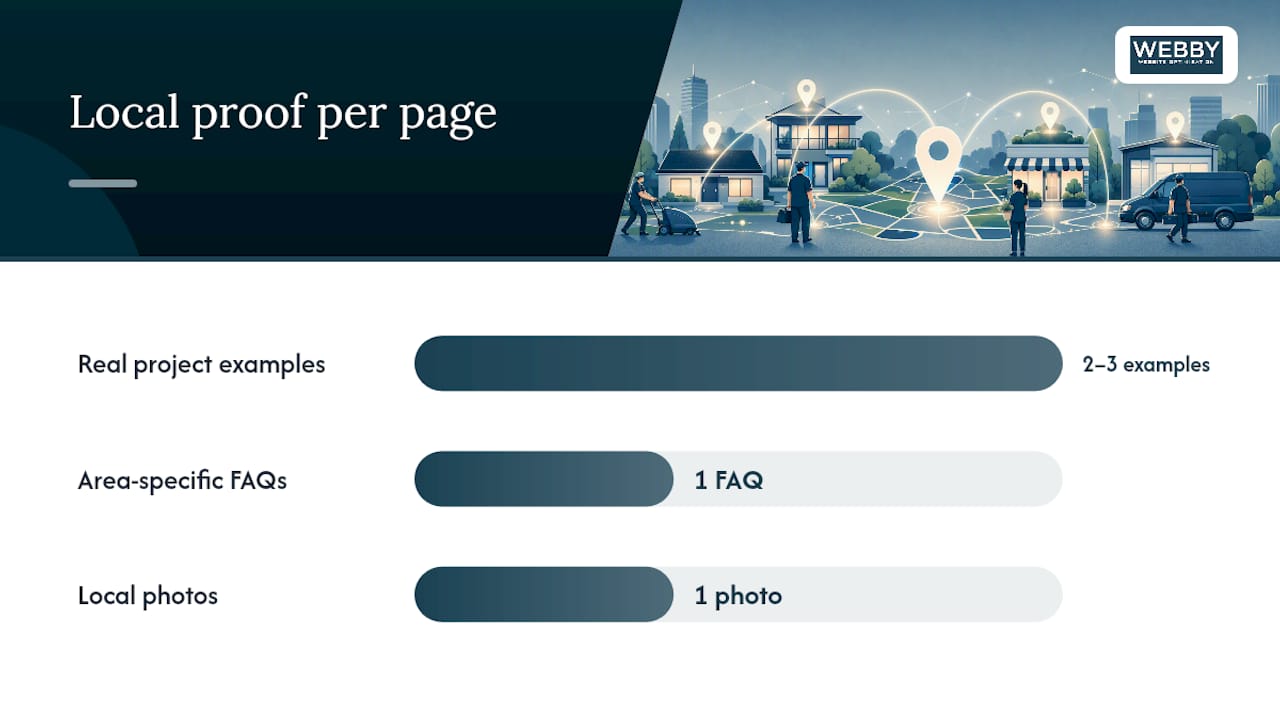
Real local proof beats generic testimonials every time. A one-line customer quote naming the suburb, paired with a photo from an actual job in that area, does more for uniqueness (and trust) than three paragraphs of marketing copy. Backlinko’s analysis of high-performing location pages points to this exact pattern: neighborhood-level detail, real project photos, and short area-specific FAQs materially increase both uniqueness and user trust.
FAQs need the same local test. Instead of “Do you offer emergency service?” on every page, ask what’s actually different in that market: permit turnaround times, seasonal demand spikes, or a specific local regulation.
Practical tactics that scale without becoming template noise:
- Pull two or three real project examples per city and rotate them as you complete new jobs.
- Write one FAQ per page that could only apply to that specific area.
- Use local photography when you have it. Stock images undercut the local-proof effect entirely.
Pro Tip: When search volume for a suburb is too thin to justify its own page, don’t force one. Fold it into a regional SAP covering a cluster of nearby towns instead, and mention each town by name within the body copy so you still capture the long-tail search.
For areas that genuinely lack any local proof yet, it’s worth being honest in the copy rather than inventing detail. A line like “we’re expanding coverage to this area in 2026” reads better than manufactured specificity that falls apart under scrutiny.
Technical Implementation: URLs, Internal Linking, Sitemaps, and Schema
Getting the technical layer right is what lets an SAP program scale past ten pages without turning into a crawl mess. Recommended URL structures for city and service pages generally follow a service-first hierarchy: /service/city/ rather than /city/service/, since it keeps topical relevance grouped under the parent service hub.
A few rules keep this clean as you scale:
- Use one consistent URL pattern across every SAP. Mixing structures confuses both crawlers and your own content team down the line.
- Canonicalize each SAP to itself, never to the parent hub. They’re targeting distinct queries and deserve to be indexed independently.
- Link every SAP back to its parent service hub, and link sideways to two or three neighboring city pages so users (and crawlers) can navigate the full service area.
- Maintain a dedicated “service areas” index page listing every city you cover, linked from your main navigation or footer.
- Submit an updated XML sitemap whenever you add a batch of new SAPs, then monitor indexing status in Google Search Console over the following two to three weeks.
On schema, the choice comes down to LocalBusiness versus Service markup. If you operate from a fixed base and travel outward, Schema that lists the cities or regions you cover without implying a public storefront in each one. If you’re a pure service offering with no fixed location tied to it at all, Service markup with areaServed can be the cleaner fit.
For multi-office setups, use LocalBusiness markup per physical office, then build SAPs around each one that link back to their nearest office and use areaServed to define the surrounding coverage. Validate every schema implementation with Google’s Rich Results Test before pushing it live. A malformed areaServed property is a common, easily missed error that quietly strips your structured data of its value.
Avoiding Doorway Penalties: A Pre-Publish Checklist and Remediation Plan
Doorway pages are Google’s specific term for what happens when SAP programs go wrong. Google’s own guidance on doorway pages describes them as pages created to rank for narrow geographic or keyword variations that funnel users toward the same destination with little unique content behind them.
Run every SAP through this checklist before it goes live:
- Does the page include at least one piece of genuinely local proof (a photo, testimonial, or case detail specific to that area)?
- Does at least one FAQ address something unique to that market rather than a generic swap?
- Would a human reader notice this page was written specifically for this city, or does it read like a mail merge?
- Is there real search demand or job history behind this page, or is it speculative coverage?
If you’ve already published a batch of thin, near-identical pages, remediation is straightforward but takes discipline. Consolidate the weakest, lowest-traffic pages into a single regional hub covering that cluster of towns. Then invest the saved effort into making your remaining Tier 1 and Tier 2 pages genuinely distinct, with real proof and area-specific content added back in before you expand further.
Pro Tip: If you’re unsure whether a set of pages crosses into doorway territory, print two of them side by side and highlight every sentence that’s identical. If more than half the page is highlighted, it needs rework before it needs more traffic.
Measurement and Maintenance: KPIs, Cadence, and Scaling Rules
Track the metrics that actually tell you whether an SAP is doing its job, not just whether it exists. Google Search Console gives you clicks, impressions, and average position per page, which tells you if the page is even being found. Local keyword rank tracking (using whatever rank tool you already run) tells you where you stand against competitors for that specific “service + city” phrase. Calls and form submissions, tracked through call tracking numbers or GA4 event goals, tell you whether the traffic converts. Assisted conversions in GA4 catch the visitors who found the SAP first but converted later through a different channel.
| Metric | Where to Track It | What It Tells You |
|---|---|---|
| Clicks and impressions | Google Search Console | Whether the page is being found and clicked |
| Local keyword rank | Rank tracking tool | Competitive position for “service + city” terms |
| Calls and form fills | Call tracking / GA4 events | Whether traffic converts to leads |
| Assisted conversions | GA4 attribution reports | Whether the page contributes earlier in the journey |
Review performance quarterly. Update anything that’s gone stale: seasonal service mentions, outdated project photos, review counts, and pricing references if you show them. A page that hasn’t been touched in over a year tends to lose the freshness signals that helped it rank in the first place.
On scaling, start with your top five to ten priority areas, prove the model works, then expand. Building forty SAPs before you’ve validated that even five convert is how most doorway-page problems start in the first place.
What We’ve Learned Building Service Area Pages for Client Sites
Across client work, the pattern repeats: businesses that skip local proof see SAPs stall around page two of search results, while businesses that add even one area-specific testimonial per page tend to see faster movement into the top five. The fix is rarely more pages. It’s better pages.
The single most common issue we see isn’t a missing SAP. It’s ten SAPs that all read the same because they were built from one template with the city name swapped and nothing else changed. Fixing that, even on just five pages, does more than doubling the page count ever will.
On the WordPress side, the cleanest setup uses a parent service hub template with child SAPs pulling from custom fields for neighborhood lists and local proof, so the shared structure stays consistent while the local content stays genuinely unique per page. Avoid page builders that auto-generate dozens of near-identical location pages from a single spreadsheet import. That approach is a fast route to a doorway-page problem, not a shortcut around one.
If you want a second set of eyes on an existing SAP rollout, local SEO services built around this exact audit process are worth exploring before you scale further.
The Three Things to Fix First
If you’re starting from zero, don’t try to build twenty pages in your first month. Get your Google Business Profile service-area settings accurate first. That single step fixes more visibility problems than any amount of on-page work when it’s wrong. Then build SAPs for your five best-performing cities, backed by real job history and real local proof, before touching anything else.
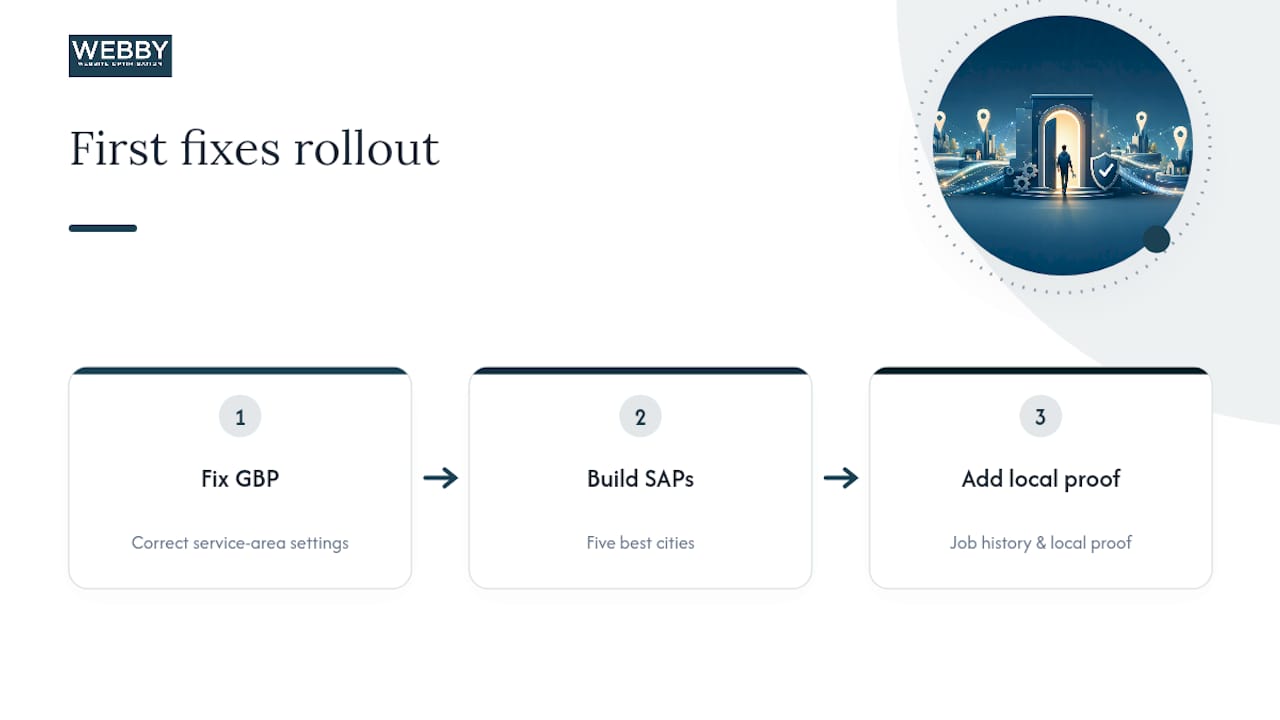
Those two moves carry the highest return for the lowest effort, because they fix the two things Google actually cross-references against each other. Everything past that (schema refinement, FAQ expansion, sitemap tuning) matters, but it matters less than getting the first five pages genuinely right.
Hire an agency when you’re past the point of managing this manually. If you’re juggling more than fifteen SAPs, tracking rank movement across all of them, and still running the rest of the business, that’s usually the signal it’s time to hand the maintenance cadence to someone else.
— Steve Doig
How Webby Website Optimisation Builds Service Area Pages That Actually Rank
Webby Website Optimisation is the alternative to guessing your way through an SAP rollout: instead of a stack of generic city pages built from one template, you get a structure designed around the doorway-safe framework covered above, local proof included from day one.

Our local SEO services focus on the audit-first approach this article walks through: reviewing your job history, checking real search demand per city, and building out Tier 1 pages before expanding further. If your current site is a WordPress build that’s outgrown its template, our website design and development work includes the parent hub and child SAP structure needed to scale without duplicate-content risk. For businesses that need pages live fast to test a new market, our website built in a day service gets a working SAP up for validation before you commit to a full rollout.
If you’re managing this in-house and want structured skill-building, a course like GetVoucher’s SEO training is worth a look. For teams planning content at volume, AmmarAI’s guidance on scaling SEO content responsibly covers workflows that avoid the templated-duplicate trap.
Start with a free audit of your existing service pages, and we’ll flag exactly where doorway risk or missing local proof is holding your rankings back.
Sources
The guidance in this article draws on established local SEO frameworks rather than any single source, and a few of them are worth reading directly if you want to go deeper on any one section:
- How to Do Service Area Page SEO for Local Search Visibility
- How to Build Location Pages That Rank, Convert, and Get Cited
- Schema
FAQ
What Does a Good Service Page Example Look Like?
A strong example combines a city-specific headline, a services list localized to that area, at least one area-specific testimonial or project photo, a short FAQ addressing a local concern, and a clear contact CTA, all built around one specific “service + city” search phrase.
What Is a Service Page on a Website?
A service page describes a specific offering your business provides, while a service area page narrows that same offering to a specific geographic market, targeting searches like “service + city” for businesses that travel to customers rather than hosting them at a fixed location.
How Do You Define a Service Area for Local SEO Purposes?
A service area should reflect where you’ve actually completed work and where measurable search demand exists, verified through job history, invoicing records, and keyword volume tools, rather than an arbitrary radius drawn around your base of operations.