
Image SEO is defined as the practice of preparing image files so search engines can crawl, index, and rank them alongside your text content. Google Lens processes over 12 billion visual searches per month, which means unoptimized images are leaving real organic traffic on the table. Every image on your site also affects Core Web Vitals, specifically Largest Contentful Paint (LCP) and Cumulative Layout Shift (CLS), both of which are direct Google ranking factors. Getting these details right is not optional for webmasters who want competitive rankings in 2026.
How to optimize images for search engines: choosing the right format
Format selection is the first decision in any image SEO workflow, and it has the biggest single impact on file size. Legacy formats like JPEG and PNG still work, but modern alternatives deliver the same visual quality at a fraction of the weight.
WebP delivers 25–34% smaller files than JPEG at equivalent quality, and browser support sits at 97%. That near-universal support means you can serve WebP as your default format today without a fallback for most audiences.

AVIF achieves roughly 50% smaller files than JPEG, making it the strongest format for photos and complex graphics. Browser support sits around 92–93%, so a fallback strategy using the HTML <picture> element is still worth implementing for full coverage.
Here is a quick format decision guide:
- Photos and complex images: AVIF first, WebP as fallback, JPEG as last resort
- Logos and icons: SVG, which scales without quality loss and adds zero pixel weight
- Screenshots and graphics with text: WebP or PNG if lossless rendering is required
- Decorative backgrounds: WebP at aggressive compression settings
Pro Tip: Use the HTML <picture> element with <source type="image/avif"> first, then <source type="image/webp">, and a final <img> tag pointing to JPEG. Browsers pick the best format they support automatically.
Modern formats like AVIF and WebP directly improve Core Web Vitals scores by reducing the time the browser spends downloading image data before it can render the page. A faster LCP score correlates with better rankings and lower bounce rates.
What are the best practices for image compression and sizing?
Compression and sizing are where most webmasters lose the most ground. Uploading a 3,000-pixel-wide image for a 600-pixel container wastes bandwidth on every single page load.
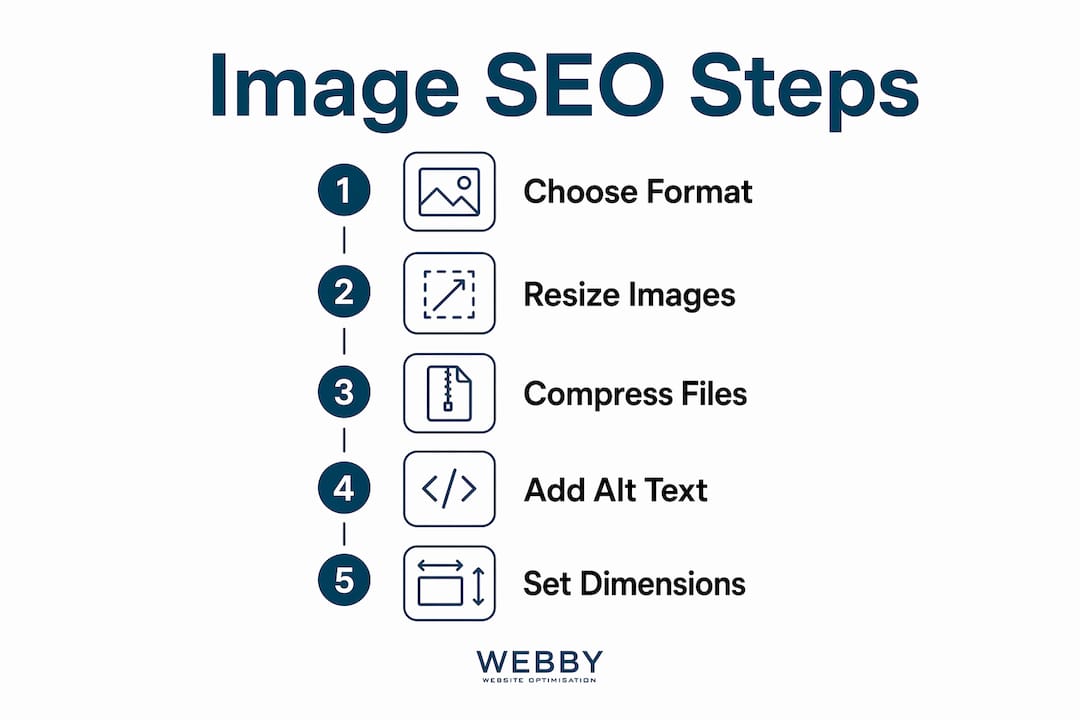
Resize images to match their display dimensions before uploading. A hero image displayed at 1,200 pixels wide needs a source file no wider than 1,200 pixels, or 2,400 pixels for retina screens using srcset. Sending extra pixels that the browser discards is pure waste.
Comprehensive image optimization can reduce image-related bandwidth by 60–80% when format conversion and responsive sizing are applied together. That reduction directly lowers page weight and speeds up LCP. Keeping total image file size under 500KB per page is a practical performance target for most service-oriented sites.
For compression settings, WebP quality at 75–80 and AVIF quality at 60–70 preserve strong visual fidelity while delivering maximum file size reduction. Go lower only for background images where detail is less critical.
Preventing layout shift with width and height attributes
Explicit width and height attributes prevent Cumulative Layout Shift, a Core Web Vitals metric that Google uses as a ranking signal. Without these attributes, the browser cannot reserve space for an image before it loads, causing visible content to jump around. That jump hurts both user experience and your CLS score.
Add width and height to every <img> tag. Even when CSS controls the final display size, the browser uses the declared ratio to hold the correct space.
Lazy loading and LCP images
Lazy loading defers below-the-fold images and improves overall page speed, but applying loading="lazy" to your hero or LCP image is a direct ranking penalty. The browser delays fetching it, which pushes your LCP time higher. Use loading="eager" or omit the attribute entirely on any image visible in the first viewport.
Pro Tip: Add fetchpriority="high" to your LCP image. This signals the browser to fetch it before other resources, cutting LCP time on most pages by a measurable margin.
How to write alt text and file names that boost rankings
Alt text is the highest-impact image SEO signal available to webmasters, and it doubles as an accessibility requirement under WCAG guidelines. Search engines read alt text to understand what an image depicts. Screen readers read it aloud to users who cannot see the image.
A proven formula for writing alt text is: [image type] + [primary subject] + [action or state] + [context]. Applied to a photo of a plumber fixing a pipe, that becomes: “Photo of a plumber repairing a burst pipe under a kitchen sink in Perth.” That description gives Google a keyword signal, a location signal, and a clear subject.
Keep alt text between 50 and 125 characters. Shorter descriptions miss ranking opportunities. Longer ones get truncated by screen readers and start to read as keyword stuffing.
File naming follows the same logic:
- Use lowercase letters and hyphens between words:
perth-plumber-burst-pipe-repair.jpg - Include your primary keyword or a close variant in the file name
- Avoid underscores, which Google treats as word joiners rather than separators
- Never use generic names like
IMG_4823.jpgorphoto1.png
Decorative images should carry an empty alt attribute (alt=""). This tells screen readers to skip the image and prevents search engines from wasting crawl budget trying to index a background texture or divider graphic.
Pro Tip: Audit your existing images with a browser accessibility tool or a site crawl. Any image missing alt text or carrying a generic file name is a quick win for both SEO and accessibility compliance.
How do structured data, sitemaps, and CDNs improve image SEO?
Technical signals beyond alt text and file names give search engines machine-readable context about your images. Three techniques deliver the most return for the effort.
ImageObject schema markup. Adding
ImageObjectstructured data to your pages tells Google the image’s subject, creator, license, and dimensions in a format it can parse without guessing. ImageObject schema increases the likelihood of images appearing in AI-generated answers and enriched search results by a factor of four. That is a significant visibility gain for product pages, service pages, and blog content.XML image sitemaps. Including image URLs in your XML sitemap gives Google a direct crawl path to every image on your site. Pages blocked by JavaScript rendering or thin internal linking often have images that never get indexed. A sitemap entry removes that barrier. Add the
<image:image>extension to your existing sitemap rather than creating a separate file.Image CDN delivery. Image CDN services automate format conversion and resizing per device and browser at the edge, removing the need to manually generate multiple image variants. A request from a Chrome browser on a mobile device receives an AVIF file sized for that screen. A request from an older browser receives a JPEG. The CDN handles the logic automatically.
Set aggressive cache headers on image assets, typically one year for static images, and use cache-busting through file name versioning when you update an image. This keeps delivery fast without serving stale files after updates.
| Technique | Primary benefit | Implementation effort |
|---|---|---|
| ImageObject schema | AI and rich result visibility | Medium |
| XML image sitemap | Crawl coverage for all images | Low |
| Image CDN | Automated format and size delivery | Medium to high |
| Cache headers | Repeat visitor load speed | Low |
Key Takeaways
Effective image SEO requires the right format, accurate dimensions, descriptive alt text, and structured data working together to improve both rankings and page speed.
| Point | Details |
|---|---|
| Choose modern formats | Serve AVIF or WebP to cut file size by 25–50% without sacrificing visual quality. |
| Set width and height attributes | Declaring image dimensions prevents CLS, a direct Google ranking factor. |
| Write descriptive alt text | Use the [image type] + [subject] + [action] + [context] formula, kept to 50–125 characters. |
| Add ImageObject schema | Structured data makes images four times more likely to appear in AI and rich results. |
| Never lazy-load your LCP image | Applying loading="lazy" to above-the-fold images worsens LCP scores and rankings. |
Why most image SEO advice misses the real bottleneck
The advice you read most often focuses on alt text and compression. Both matter. But in my experience working on site performance across dozens of service business websites, the single most overlooked issue is the sizes attribute on responsive images.
When you use srcset without a correct sizes attribute, the browser has no way to know how large the image will display before it downloads it. So it defaults to the largest available source. Missing the sizes attribute inflates bandwidth usage by 50–70% on responsive image sets. That is not a minor inefficiency. It wipes out most of the gains from switching to WebP or AVIF in the first place.
The second thing I see consistently is webmasters applying the same compression settings to every image on a page. Your hero image and your thumbnail do not need the same treatment. The hero image is often the LCP element, so it needs to be fast and visually sharp. Thumbnails in a gallery can take heavier compression without anyone noticing.
Integrating image SEO techniques with your broader on-page SEO strategy is where the real ranking gains appear. An image with strong alt text, a keyword-rich file name, and an ImageObject schema entry reinforces the same topic signals as your heading tags and body copy. That coherence is what pushes pages from page two to page one.
How Webby Website Optimisation handles image SEO for your site
Image optimization touches file formats, server configuration, structured data, and on-page SEO simultaneously. Getting all of those right without a technical background is genuinely difficult.
Webby Website Optimisation builds and optimizes websites for service businesses in Perth, Fremantle, and Melville with image SEO built into every project from the start. That includes WebP and AVIF delivery, ImageObject schema, XML sitemaps, and Core Web Vitals tuning. If your current site is slow or invisible in Google Images, the team at Webby Website Optimisation can audit and fix the underlying issues. Explore the website design and development service to see what a properly optimized site looks like, or check out the SEO services page for a full picture of what technical optimization covers.
FAQ
What is the best image format for SEO in 2026?
AVIF is the best format for photos and complex graphics, delivering roughly 50% smaller files than JPEG. WebP is the recommended fallback, with 97% browser support and 25–34% smaller files than JPEG.
How long should alt text be for SEO?
Alt text should be 50–125 characters. Use the formula: [image type] + [primary subject] + [action or state] + [context] to cover both SEO keyword signals and accessibility requirements.
Does lazy loading hurt SEO?
Lazy loading hurts SEO when applied to hero or LCP images. Use loading="lazy" only on images below the fold, and set loading="eager" or fetchpriority="high" on the primary above-the-fold image.
What is ImageObject schema and why does it matter?
ImageObject schema is structured data markup that gives search engines machine-readable metadata about an image. Pages with ImageObject schema are four times more likely to have their images cited in AI-generated answers and rich search results.
How do I stop images from causing layout shift?
Add explicit width and height attributes to every <img> tag. This lets the browser reserve the correct space before the image loads, preventing the content jumps that hurt your CLS score and rankings.