
Google Business Profile categories tell Google what your business actually is, and that single classification decides whether you show up in the Local 3-Pack, Maps results, and category-specific searches. Google maintains this taxonomy and lets you assign a primary category along with multiple secondary categories. The fix that matters most right now: check your primary category and make it as specific as the list allows.
TL;DR:
- Choosing the most specific primary category enhances local search visibility and unlocks relevant features like booking buttons and menu links.
- Limiting secondary categories to two or four aligned with customer-facing services maintains clarity and prevents dilution of your core relevance signal.
- Regularly auditing and updating categories ensures your profile stays precise as Google adds or retires categories, which can impact your local ranking.
- Avoid broad or generic categories like “Store” or “Business,” and never overload secondary categories with unrelated services to maintain a narrow, expert profile.
- Re-verification may be triggered by category changes, so timing edits carefully before peak seasons and monitoring results for several weeks is crucial.
Table of Contents
- What Are Google Business Profile Categories?
- Primary vs. Secondary Categories: The Rules and the Reality
- How to Choose the Best Categories for Your Business
- How to Add or Edit Categories in Your Business Profile
- Category-Specific Features You Can Unlock
- Common Mistakes and Best Practices for GBP Categories
- Where to Find the Full Category List and Developer Tools
- Category Changes, Re-Verification, and Timing
- How Webby Website Optimisation Audits and Optimizes GBP Categories
- How Webby Website Optimisation Can Help With Your Category Audit
- Sources
What Are Google Business Profile Categories?
Categories are the tags Google uses to match your business to what people actually search for. Pick “Italian Restaurant” instead of “Restaurant,” and Google understands your business at a level of detail that determines whether you show up for “best pasta near me” or get buried under a thousand generic dining listings.
Google controls this list directly, and it’s bigger than most business owners realize. Third-party trackers put the total at roughly 4,000-plus distinct categories, covering everything from “Vegan Restaurant” to “Emergency Dental Service” to oddly specific entries like “Falconry Center.” That count shifts as Google adds and retires categories, which is exactly why a category picked in 2022 might no longer be the sharpest option available today.
Categories do two jobs at once, and business owners often only think about the first one.
Job one: relevance matching. Google’s local algorithm leans on your category as one of its core signals for ranking in Maps and the Local 3-Pack. Google itself confirms categories affect local ranking and can unlock features tied specifically to what you’re classified as.
Job two: feature unlocking. Certain categories trigger profile capabilities that generic ones don’t. A restaurant category can surface menu links, ordering buttons, and reservation widgets. A hotel category opens up class ratings and amenity icons. A category like “Hair Salon” enables an appointment booking button that a vague “Beauty Business” listing never gets.
Here’s what categories control on your profile:
- Whether you appear for category-specific searches (“plumber near me” vs. just “home services”)
- Eligibility for booking buttons, menu links, and product highlights
- Which attributes Google lets you add (accessibility, amenities, payment options)
- How your business gets grouped against competitors in the Local 3-Pack
- Labels that appear next to your business name in search results
The mistake most owners make is treating categories as a formality they fill out once during setup and never touch again. Google updates this taxonomy regularly, adds new granular categories, and retires vague ones. A landscaping company that set up its profile in 2019 might be sitting on a category that’s technically still valid but far less precise than what’s available now.
Primary vs. Secondary Categories: The Rules and the Reality
You get exactly one primary category. You can add up to nine secondary categories on top of it. That’s the official structure, straight from Google’s own documentation, and it’s not negotiable.
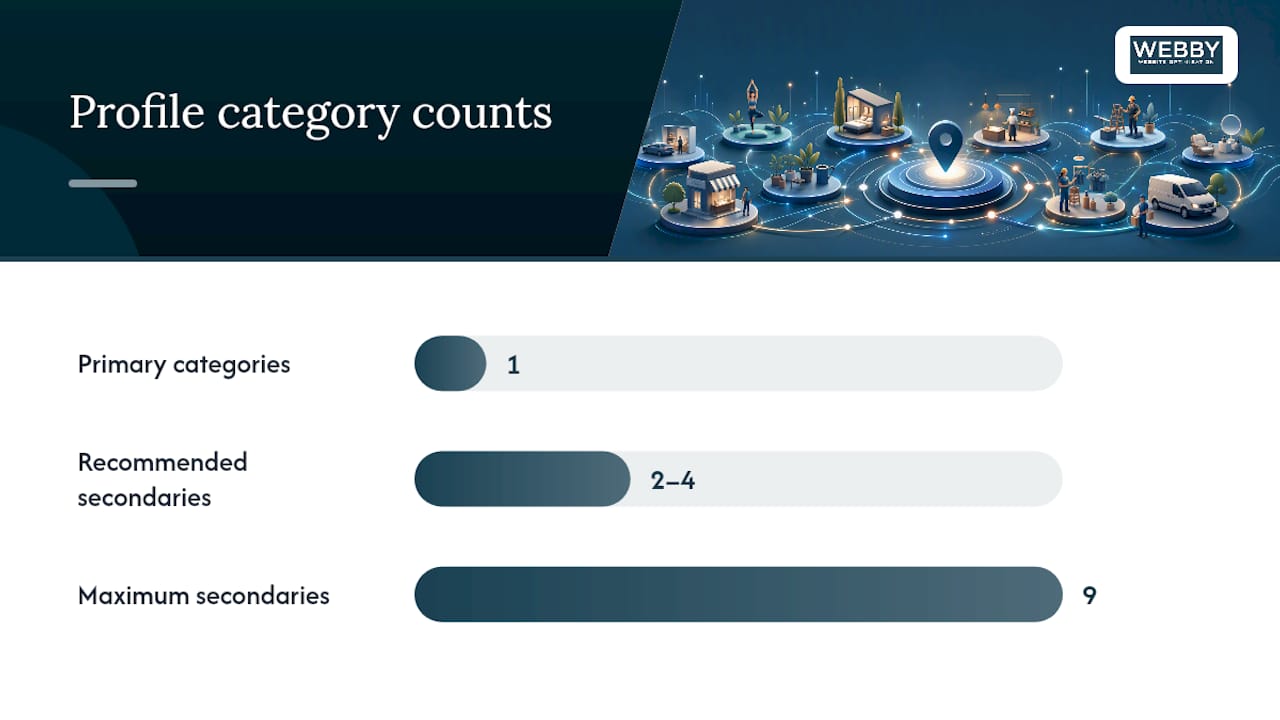
What is negotiable is how many secondaries you actually use, and this is where a lot of profiles go wrong. Google’s own guidance points toward choosing “the most specific category available” for your primary rather than defaulting to something broad. A tree service should be “Tree Service” or “Arborist,” not “Landscaper,” even though landscaping is technically adjacent.
The practitioner rule that holds up across most local businesses: one precise primary category, plus two to four secondaries that are tightly aligned with what you actually offer. Not nine. Nine is the ceiling, not the target.
Why does piling on secondaries backfire? Every additional category you add dilutes the specificity signal your primary category sends. If you’re a “Divorce Lawyer” but you tack on “Personal Injury Attorney,” “Business Attorney,” “Notary Public,” and five more just because you’re technically qualified to touch those areas, Google reads a blurrier picture of what you’re actually known for. The businesses that dominate local search tend to look narrow and confident, not broad and hedge-everything.
Consider two law firms with identical service pages:
- Firm A: Primary category “Family Law Attorney,” secondaries “Divorce Lawyer” and “Child Custody Attorney”
- Firm B: Primary category “Attorney,” secondaries covering eight practice areas
Firm A reads as a specialist. Firm B reads as a generalist competing against every law firm in the metro area for the word “Attorney,” which is one of the most contested categories that exists.
Pro Tip: Before you add a secondary category, ask yourself if it represents something a customer would actually search for and find on your service page. If the answer is no, skip it. Secondaries should mirror distinct, customer-facing offerings, not every certification you happen to hold.
A precise primary category is often the single biggest lever you can pull on your entire profile. Bigger than adding photos. Bigger than posting weekly updates. If you only fix one thing on your Business Profile this year, fix this.
How to Choose the Best Categories for Your Business
Picking categories isn’t guesswork if you approach it methodically. Here’s the process that actually works, step by step.
- List what you ARE, not everything you do. Write down the core identity of your business in plain language. A bakery that also sells coffee is still a bakery first. Don’t try to capture every service line in your primary category.
- Search Google’s category list for exact and near-exact matches. Type keywords related to your core business into the category field when editing your profile and see what Google surfaces. The list is searchable, and near matches show up as you type.
- Check how the top three local competitors are categorized. You can’t see a competitor’s category list directly in search results, but the businesses ranking in the Local 3-Pack for your target terms give you a strong hint about which category Google rewards for that search. If every top-ranked “emergency plumber” search shows businesses that also mention 24-hour service, that’s a signal worth studying.
- Choose the most specific category that still fully describes your business. Specific beats broad almost every time, as long as it’s accurate. Don’t classify yourself as “Emergency Dental Service” if you don’t actually offer emergency appointments.
- Add secondaries only for genuinely distinct, customer-facing services. A general contractor who also does kitchen remodels specifically might add “Kitchen Remodeler” as a secondary. A general contractor who occasionally paints a fence probably shouldn’t add “Painter.”
A few real-world comparisons make the pattern clearer:
- A mobile mechanic should choose “Mobile Mechanic” or “Auto Repair Shop,” not “Automotive Business”
- A day spa offering massage should choose “Massage Spa” or “Day Spa,” not just “Spa”
- A HVAC company that specializes in AC repair should lead with “Air Conditioning Repair Service” rather than generic “HVAC Contractor,” if repair is genuinely the bulk of the business
- A coffee shop with a full breakfast menu might justify “Coffee Shop” as primary and “Breakfast Restaurant” as a secondary, rather than trying to cram both into one category
Notice none of these examples reward the vaguest possible label. Every “better choice” in that list is narrower and more descriptive than the “worse choice,” and that pattern holds across almost every industry. The businesses that treat category selection like a checkbox exercise end up competing in the widest, most crowded bucket available. The ones that treat it like a positioning decision end up owning a smaller, far more winnable slice of local search.
One more thing worth flagging here: if you run multiple independently operated businesses under one roof, like a coffee counter inside a gym, Google’s guidance recommends separate profiles for each public-facing business rather than stacking every category onto a single listing.
How to Add or Edit Categories in Your Business Profile
Changing your category takes about two minutes once you know where to click, but the path differs slightly depending on whether you’re on desktop or mobile.
On desktop:
- Sign in to your Business Profile at Google Business Profile Manager or search your business name directly in Google.
- Click “Edit profile,” then find the “Business information” tab.
- Select the “Contact” or “About” section (Google occasionally shifts the exact menu label during interface updates) and look for “Category.”
- Click the pencil icon next to your primary category to change it, or click “Add another category” to add a secondary.
- Type your search term, choose from the dropdown suggestions (you cannot type a custom category that isn’t already in Google’s list), and click “Save.”
On mobile (Google Maps or Search app):
- Tap your profile photo or search your business name, then tap “Edit profile.”
- Scroll to “Business information” and tap “Category.”
- Tap the category you want to change, search for the replacement, and tap “Done.”
- Repeat to add secondaries, then save your changes.
Removing a secondary category follows the same path. Tap the existing category, and you’ll find a remove or delete option alongside the edit field.
For multi-location businesses or agencies: manually editing categories one listing at a time doesn’t scale past a handful of locations. This is where the Google Business Profile API’s categories.list endpoint becomes worth setting up. It returns stable category IDs and display names that developers can pull into bulk update scripts, which matters when you’re managing dozens or hundreds of listings that all need the same category audit applied at once. A business managing five locations wastes hours doing this by hand; a business managing fifty can’t do it by hand at all.
Category-Specific Features You Can Unlock
Your category choice isn’t just about search matching. It directly determines which interactive features show up on your profile, and those features often drive the click that turns a search into a customer.
- Restaurants: Menu links, online ordering buttons, and table reservation widgets, all gated behind food-service categories
- Hotels and lodging: Star class indicators, amenity icons (pool, parking, pet-friendly), and room booking integration
- Health and beauty: Direct appointment booking buttons, which only appear for categories Google recognizes as service-based and bookable
- Retail: Product highlights and inventory showcases, letting you feature specific items directly in the profile
- Auto services: Service menus that list specific repair types customers can select before calling
These features show up as visual differentiators in search results. A restaurant listing with a visible “Order Online” button next to it pulls the eye and the click compared to a competitor’s plain listing with no interactive element at all. Labels function the same way. A “Family Friendly” or “Black Owned” attribute, unlocked in part by having the right category assigned, changes how a listing reads at a glance before a customer even opens the profile.
A local business that shifts from a vague category to the precise category matching its actual booking-enabled service type often sees the profile go from a static listing to one with a working call-to-action button, which tends to lift click-through simply because there’s now something to click.
Common Mistakes and Best Practices for GBP Categories
Most category problems fall into three repeat offenders.
Choosing a generic primary category. “Store,” “Service,” and “Business” show up constantly as primary categories, and every one of them puts you in the widest possible competitive pool. Specificity is the entire point of the category system, and generic choices throw that advantage away.
Overloading secondary categories. Just because you can add nine doesn’t mean you should. Piling on every tangential service dilutes the clarity Google needs to match you correctly, and it can make your business look unfocused to anyone actually reading your listing.
Adding internal departments as categories. A hospital shouldn’t try to represent “Radiology,” “Cardiology,” and “Emergency Room” all as categories on one profile. Those are departments, not separate businesses, and cramming them into the category field muddies what should be a clean classification.
Best practice guardrails worth building into your routine:
- Run a category audit once a quarter, since Google adds new, more granular categories regularly and last year’s best option might not be this year’s
- Stick to one primary category and two to four genuinely aligned secondaries
- Change one variable at a time when testing, either the primary category or a single secondary, never several fields simultaneously
- Give any change two to six weeks before drawing conclusions, tracking organic traffic, phone calls, and map impressions
Pro Tip: If your visibility drops after a category edit, check whether Google flagged your profile for re-verification first. That alone can explain a temporary dip that has nothing to do with the category itself. If the drop persists past a few weeks, revert to your previous primary category and test a different alternative rather than guessing again from scratch.
If rankings dip after a category change, work through it methodically: confirm the profile isn’t sitting in re-verification limbo, compare current impressions against your baseline in Google Business Profile insights, and only revert if the data after several weeks genuinely points to the new category underperforming the old one.
Where to Find the Full Category List and Developer Tools
Two paths exist for browsing Google’s category taxonomy, and which one you need depends on whether you’re managing one listing or fifty.
For a single business, the dashboard picker inside Business Profile Manager is the right tool. Start typing a term into the category field and Google surfaces every matching option live, which is faster and more reliable than any static list since it reflects whatever version of the taxonomy is currently live.
For developers, agencies, or anyone managing multiple locations, the categories.list endpoint in the Google Business Profile API returns the full set of category IDs and display names programmatically. This matters for automation. An agency running audits across dozens of client profiles can pull the current list once, cross-reference it against every client’s existing category, and flag mismatches in bulk instead of clicking through each profile manually.
Third-party tools fill the gap when you want a browsable list outside Google’s own interface:
| Resource | Best for | Caveat |
|---|---|---|
| OpenWeb Ninja’s category list | Browsing the full taxonomy at a glance | Counts shift as Google updates categories; confirm the publish date |
| PlePer’s searchable category tool | Quick lookups and keyword-based searches | Same caveat; cross-check against the live dashboard picker before committing |
| Google Business Profile API | Bulk audits, automation, multi-location management | Requires developer setup; overkill for a single-location business |
Whichever source you use, verify it against the live dashboard picker before finalizing a decision. Third-party lists are useful for research and brainstorming, but Google’s own picker is the only source that reflects the taxonomy as it exists right now.
Category Changes, Re-Verification, and Timing
Editing your category isn’t always a quiet, instant change. Google treats significant profile edits, including category changes, as a trigger for re-verification in some cases, which is Google’s automated safeguard against listing manipulation.
A few timing rules worth building into your process:
- Avoid major category changes right before or during your busiest marketing season, since a re-verification hold can temporarily affect visibility at the worst possible moment
- Give any category change one to four weeks of monitoring before you judge whether it worked
- If you get a re-verification request, respond promptly with accurate documentation. Delayed responses extend the window your profile spends in limbo
- Keep a record of what your category looked like before the change, so reverting is a fast, clean decision rather than a guessing game
Treat category edits the way you’d treat any change to a live asset that generates leads: plan for a short adjustment window, and don’t make the change the week before your busiest season starts.
How Webby Website Optimisation Audits and Optimizes GBP Categories
We run regular category reviews because Google’s taxonomy shifts more often than most owners expect, and a category that was the sharpest option two years ago can quietly become the second-best choice today. Our process isolates one variable at a time, changes it, then tracks organic visibility and call volume before making further changes.
A client had been using a broad, generic primary category for years. Refining it to a more specific match, alongside trimming an overloaded secondary list down to a focused set, improved their profile’s Local 3-Pack positioning for core service terms within a few weeks.
Single-location businesses with the time to research their own category list can often handle this DIY. Multi-location operators and busy businesses may get more value from outsourcing the audit.
How Webby Website Optimisation Can Help With Your Category Audit
Specialist providers run Google Business Profile audits category by category, testing one change at a time instead of guessing. If you’ve read this far and you’re still not sure whether your primary category is the sharpest one available, that uncertainty is exactly what a proper audit resolves.

Local SEO work includes GBP category audits, primary and secondary category optimization, and ongoing monitoring so category changes do not go untested for extended periods. We pair this with website design and development when a client’s site itself is holding back conversions once the profile traffic starts flowing in correctly. If your current setup was built years ago and never revisited, a website built in a day can get a modern, fast site live while we work through the profile side in parallel.
Contact for an audit to assess whether your current category impacts visibility and to discuss potential improvements.
Sources
- Manage your business category – Google Business Profile Help
- All Google Maps Business Categories (4,047) | OpenWeb Ninja
- Google Business Profile Categories – Full List (2026) | PlePer