
Think of a WordPress website maintenance plan as the dedicated pit crew for your business's most valuable online asset. It's a comprehensive service package designed to keep your site secure, updated, and performing at its peak, so you don't have to worry about the technical stuff.
It's essentially insurance for your digital storefront, preventing costly downtime, security breaches, and performance glitches before they can ever impact your bottom line.
Why Your Website Is at Risk Without a Maintenance Plan

Imagine your website is a high-performance vehicle, constantly working to bring in leads and sales. You wouldn't drive that car for years without servicing it, would you? A WordPress site is exactly the same; it needs regular, expert attention to run reliably and safely.
Flying solo without a maintenance plan is like driving with your eyes closed on a digital highway riddled with hazards. A single outdated plugin can become an open invitation for hackers, while a botched update could trigger the infamous "white screen of death," knocking your entire site offline in an instant.
The Real Consequences of Neglect
For most businesses, a website is the main point of contact with customers. When it goes down, the fallout is immediate and often severe. Forgetting about maintenance isn't just a technical slip-up; it's a major business risk.
Here’s what you're gambling with:
- Sudden Website Crashes: A simple conflict between a newly updated plugin and your theme can break the entire site, leaving visitors staring at an error message.
- Devastating Security Breaches: Hackers run automated scripts 24/7, searching for websites with known security holes. An unpatched vulnerability is like leaving the front door of your business unlocked.
- Complete Data Loss: Without frequent, off-site backups, a server crash or a hack could wipe out years of your hard work, customer information, and transaction history for good.
- Poor Performance and Lost Sales: A slow, clunky website doesn't just annoy visitors—it kills conversions and tells Google to rank you lower, directly hitting your traffic and revenue.
Neglecting your website is like ignoring a leaky roof in your shop. At first, it’s a minor drip, but eventually, it causes catastrophic damage that is far more expensive to fix than preventative maintenance ever would have been.
The Shift from Reactive to Proactive
A WordPress maintenance plan flips the script from frantic, reactive fire-fighting to calm, proactive prevention. Instead of desperately searching for help after your site has been compromised or has crashed, you have a trusted partner working in the background to make sure those disasters never happen in the first place.
This proactive shield keeps your digital asset secure, fast, and dependable. It turns website upkeep from a stressful, time-sucking chore into a seamless, managed service. This isn't just an IT cost—it's a smart investment in your business's stability, reputation, and growth. Partnering with a specialist like Webby Website Optimisation provides that essential peace of mind.
So, What Do You Actually Get in a WordPress Maintenance Plan?
Let's pull back the curtain on what a WordPress website maintenance plan really is. It’s easy to think of it as just some kind of vague digital insurance policy, but a proper plan is much more hands-on. It's an active, ongoing service built on four critical pillars, all working together to keep your website healthy, secure, and running like a well-oiled machine.
Think of it this way: you wouldn't drive your car for years without getting it serviced. Your website is no different. These services are the regular tune-ups, security system checks, and emergency-preparedness drills that protect your most valuable online asset. Without them, you’re basically leaving your digital front door wide open.
Consistent Updates to Keep Hackers Out
The absolute bedrock of any maintenance plan is managing updates. The WordPress world moves fast. Developers are constantly releasing new versions of the core software, along with updates for themes and plugins. These aren't just for fancy new features; most of the time, they contain vital patches for security holes.
An out-of-date plugin is like a broken window on your house—it’s one of the easiest ways for a hacker to get in. A professional service handles these updates methodically:
- Core WordPress Updates: Making sure your site is always on the latest and most secure version of WordPress itself.
- Plugin Updates: This is a big one. We regularly update every plugin to shield your site from newly discovered threats.
- Theme Updates: Your site's theme also needs to be kept current to avoid conflicts and close any security gaps.
And this isn't about blindly clicking the "update" button and hoping for the best. A smart provider will test updates on a separate staging site first. This crucial step ensures a new plugin version won’t suddenly break your live website, a nightmare scenario that many DIY site owners discover the hard way.
Automated Offsite Backups: Your Digital Safety Net
Ask yourself this: if your website vanished right now, could you get it back online in minutes? If the answer is no, you need to think about backups. A solid maintenance plan includes automated, frequent backups of your entire website—every file, every image, and the all-important database.
But here’s the key detail: these backups are always stored off-site, on a completely separate, secure server. Why does that matter? If your web hosting server completely fails or gets compromised, your backups are safe and sound somewhere else, ready to be restored. It removes the single point of failure that could otherwise wipe you out.
A website without a reliable, recent backup is a business one accident away from disaster. It’s the digital equivalent of operating without insurance, where a single unforeseen event can lead to a total loss.
With this in place, a worst-case scenario becomes a manageable inconvenience. It's a simple restoration job, not a frantic, expensive scramble to rebuild your entire online presence from scratch.
Vigilant Security Scanning to Stop Threats in Their Tracks
While updates patch known security holes, you still need an active guard on duty. Automated bots are constantly prowling the internet, scanning for vulnerable websites to attack. A purely defensive strategy just isn't enough anymore.
A comprehensive maintenance plan adds layers of active security to fend off these threats:
- Regular Malware Scanning: We proactively hunt for any malicious code that might have snuck into your site's files.
- Web Application Firewall (WAF): Think of this as a digital security guard standing between your website and the internet, blocking suspicious traffic before it even gets a chance to cause trouble.
- Login Protection: Implementing measures to stop brute-force attacks, where bots relentlessly try to guess your password.
Here in Australia, where 1.54% of all live WordPress websites globally are hosted, the risk of neglect is huge. Frighteningly, statistics show that a staggering 60% of site owners don't bother with monthly core updates, and 75% ignore weekly security log checks. This leaves their sites dangerously exposed. You can read more about these critical WordPress statistics and see why proactive care is non-negotiable for Aussie businesses.
Performance Tuning for Speed and Happy Visitors
Finally, a slow website is a broken website. Speed is everything—it impacts user experience, keeps visitors engaged, and is a major factor in how Google ranks you. A great maintenance plan isn't just about defence; it’s about making your site perform at its absolute best.
This involves ongoing optimisation tasks to keep your site lean and fast:
- Database Optimisation: Over time, your website's database gets clogged with junk—old post revisions, spam comments, and temporary data. We clean this out regularly to keep your site snappy.
- Uptime Monitoring: Your site is monitored 24/7. The second it goes offline, your maintenance provider gets an alert and jumps in to figure out what’s wrong.
- Performance Checks: We run regular speed tests to analyse your site’s loading times, pinpointing bottlenecks and fixing them before they become a problem.
Here’s a quick summary of how these core components work together.
Core Components of a WordPress Maintenance Plan
| Maintenance Task | Why It's Critical | Risk of Neglect |
|---|---|---|
| Updates (Core, Plugin, Theme) | Patches security vulnerabilities and ensures software compatibility. | High risk of being hacked through known exploits; website may break. |
| Offsite Backups | Provides a complete, restorable copy of your site in case of disaster. | Total data loss from hacking, server failure, or human error. |
| Security Scanning & Firewall | Actively blocks attacks and detects malware before it can do damage. | Undetected infections, blacklisting by Google, stolen customer data. |
| Performance Optimisation | Ensures a fast, smooth user experience and improves SEO rankings. | Poor user engagement, high bounce rates, lower search engine visibility. |
When you put these four pillars together, "maintenance" stops being a vague expense and becomes a clear, tangible service. It's a complete system designed to secure, protect, and optimise your most important digital asset.
Protecting Your Site from Unseen Digital Threats

Think of every outdated plugin on your WordPress site as an unlocked door. It might not look like much, but digital threats are constantly rattling the handle, testing for a way in. These aren’t lone hackers in hoodies; they’re sophisticated, automated bots programmed to find and exploit a single vulnerability across thousands of websites at once.
Your website is a target, plain and simple, no matter its size. These bots aren’t hunting for big brands; they’re looking for specific, well-known weaknesses in software that hasn't been updated. Once they find an entry point, the damage can be anything from subtle to absolutely catastrophic.
The Real Threats Lurking Online
The danger goes far beyond your site simply going down. Cybercriminals have a whole playbook of ways to exploit an unprotected WordPress installation, and each one can seriously harm your business and its reputation.
Common attacks you need to worry about include:
- Malware Injection: This is where malicious code gets secretly slipped into your website's files. It could be used to steal customer credit card details, send your visitors to scam sites, or even use your own server to blast out spam emails, which gets your domain blacklisted.
- Brute-Force Attacks: Imagine automated scripts hammering your login page with thousands of username and password combinations every minute. That’s a brute-force attack, and a weak password stands no chance.
- SEO Spam (Japanese Keyword Hack): A nasty one where your site gets hijacked to show spammy links and content, often in foreign languages. This completely destroys your search engine rankings and can get your site removed from Google altogether.
Security statistics paint a grim picture for unmaintained WordPress sites here in Australia. A shocking 75% of AU site owners don't bother with weekly security log checks and 60% skip core updates, leaving massive holes for attackers. Given that plugin vulnerabilities are behind up to 90% of hacks, this neglect is practically an open invitation for disaster.
Proactive Defence: The Core of a Good Plan
A solid WordPress website maintenance plan doesn’t just sit around and wait for an attack. It builds a fortress around your site with multiple layers of proactive defence, designed to stop threats before they even get to your digital doorstep.
Key defensive measures should always include:
- Web Application Firewall (WAF): This acts like a security guard for your website. It inspects all the traffic coming in and blocks malicious requests from known bad actors before they can do any harm.
- Regular Malware Scanning: Think of this as a regular health check-up. Automated, deep scans of your website’s files are run to find and quarantine any suspicious code that might have slipped through the net.
- Hardened Login Security: Simple things make a huge difference here. Two-factor authentication (2FA), limiting login attempts, and enforcing strong passwords make it infinitely harder for brute-force attacks to succeed.
These tools all work together, creating a secure environment where threats are handled automatically. It’s a level of constant vigilance that most business owners simply don't have the time or technical know-how to manage themselves.
A proactive security plan transforms your website from a passive target into a hardened asset. It’s the difference between leaving your doors and windows wide open and having a modern, monitored security system protecting your property 24/7.
What Happens When the Worst Occurs
Even with the best defences in place, a determined attacker can sometimes find a way through. This is where a maintenance plan truly proves its worth. Without one, you’re left scrambling in the middle of a crisis.
The process of recovering from a hack is stressful, time-consuming, and expensive. It means finding the breach, cleaning thousands of infected files, restoring from a backup (which you hope is clean), and then begging Google to remove your site from its blacklist—all while your business is offline and losing money.
With a good maintenance plan, this catastrophe becomes a managed, minor event. Your provider gets an alert, isolates the issue, and restores a clean, recent backup within minutes or hours, not days. They handle the entire cleanup, making sure your site is fully secure before it goes live again. It turns a potential business-ending disaster into a small hiccup, giving you invaluable peace of mind. For a deeper dive into defensive strategies, have a look at our comprehensive guide covering the WordPress best practices checklist.
How Maintenance Boosts Your SEO and Conversions
It’s easy to think of a WordPress website maintenance plan as just an insurance policy—a necessary cost to fend off hackers and prevent catastrophic crashes. And while that protection is absolutely vital, that view only tells half the story. Proactive maintenance is actually one of the smartest investments you can make for business growth, directly impacting how you show up on Google and how well you convert visitors into customers.
Think of it less like a shield and more like a tune-up for a race car. A fast, secure, and flawlessly running website isn't just a technical detail; it's the engine of your digital presence, built to attract more traffic and drive more revenue.
The Undeniable Link Between Speed and SEO
Google's mission is simple: give people the best results and the best experience. A huge part of that experience is how fast a website loads. For years, Google has been crystal clear that page speed is a direct ranking factor for both desktop and mobile searches.
A good maintenance plan doesn't just fix things; it includes ongoing performance optimisation. This isn't a one-and-done task but a continuous effort to keep your site lean, mean, and lightning-fast.
Key performance tasks usually involve:
- Database Optimisation: Think of it like a digital declutter. We regularly clean out old post revisions, trash, and spam comments that bog down your site's database.
- Image Compression: Ensuring every image is perfectly optimised for the web—small file size, fast loading—without losing visual quality.
- Caching Configuration: Setting up systems that serve visitors a saved, ready-to-go version of your page. This stops the server from having to build the page from scratch for every single visitor, which is a massive speed boost.
These consistent, small tweaks stop your site from getting slow and clunky over time. The payoff? A zippy website that Google loves, making it much easier for new customers right here in Australia to find you online.
A slow website is like having a shop with a sticky front door. Even if you have the best products inside, many potential customers will get frustrated and leave before they even get a chance to look around.
Enhancing User Experience to Drive Conversions
Speed gets people in the door, but a smooth, hassle-free experience is what makes them stay and buy. Regular maintenance ensures every button, link, and form on your site works exactly as it should.
This means no more dead ends from broken links, no plugin conflicts that stop your contact form from sending, and definitely no scary security warnings that make potential customers run for the hills. A website that is consistently reliable builds trust, and trust is the currency of the internet. When people trust your site, they're far more likely to do business with you.
This polished user experience has a direct impact on the metrics that search engines use to judge your site's quality:
- Lower Bounce Rates: Visitors stick around instead of leaving immediately.
- Longer Session Durations: People spend more time exploring what you have to offer.
- Higher Engagement: Users are more likely to interact, click, and convert.
These signals tell Google that your site provides real value, which can give your rankings another welcome nudge. By creating a flawless technical foundation, a maintenance plan sets the stage for your marketing to shine. If you're keen to turn more of that traffic into leads, check out our guide on how to improve the conversion rate of your web pages.
Ultimately, proper maintenance turns your website from a static online brochure into an active, high-performing asset that genuinely fuels your business.
Choosing the Right Maintenance Plan for Your Business
Not all WordPress website maintenance plans are cut from the same cloth. Picking the right one is a bit like choosing the right tool for a job—you wouldn't use a sledgehammer to hang a picture frame, right? In the same way, a simple five-page brochure site doesn’t need a premium enterprise plan.
The secret is to match the service level to your business's specific needs, your goals, and just how complex your website is. It all starts with being honest about what your website actually does. Is it a simple digital business card? A well-oiled machine for generating leads? Or a busy e-commerce store juggling hundreds of transactions every day? Each one has very different stakes and needs a different kind of protection.
Aligning the Plan With Your Website Type
Let's break down how different types of websites demand different maintenance strategies. The more your business relies on its website for day-to-day operations and revenue, the more thorough your maintenance plan needs to be.
Simple Brochure Websites: If your site is mainly there to provide information and has a basic contact form, a foundational plan is usually all you need. This should cover the essentials like core updates, security scans, and daily backups to keep it safe and online.
Lead-Generation Websites: For businesses that count on their site to bring in new leads—think service providers or B2B companies—performance and uptime are everything. A solid mid-tier plan that adds performance optimisation and faster support is a smart move. It ensures your site is always snappy and ready for potential clients.
E-commerce Stores: An online store is the business itself. When it goes down, sales stop. These sites require a premium plan with features like real-time backups, advanced security, specialised WooCommerce support, and lightning-fast response times for any problems.
For any Australian business, the numbers make a compelling case. Research from Gartner shows that website outages can set a local small business back an average of AU$7,900 per hour. A single crash that lasts just four hours could mean a loss of over AU$30,000. Suddenly, the cost of a comprehensive plan seems like a very small price to pay.
Key Questions to Ask a Potential Provider
Once you have a good idea of what you need, it’s time to vet potential providers. Don't be shy about asking tough questions—you're hiring someone to protect one of your most important assets. A truly professional provider will appreciate your diligence.
Choosing a maintenance provider is like hiring a key team member. You need to trust their expertise, understand their processes, and be confident they'll be there for you when things go wrong.
Before you sign on the dotted line, make sure you get clear, confident answers to these questions:
- What is your process for updates? The right answer involves testing updates on a separate staging site first. This catches any conflicts before they can break your live website.
- How often do you take backups, and where are they stored? Daily backups stored off-site are the absolute minimum. You should also ask about their process for restoring a backup if needed.
- What specific security measures do you include? Look for a multi-layered approach: malware scanning, a web application firewall (WAF), and brute-force protection are key.
- What’s your guaranteed response time for support tickets? You need to know what to expect if your site goes down. Is their support team based in Australia and available during your business hours?
- What happens if my site gets hacked? Does the plan include malware cleanup and removal? Or is that treated as a costly emergency extra?
This flowchart shows the clear path from a healthy, fast website to real business growth.
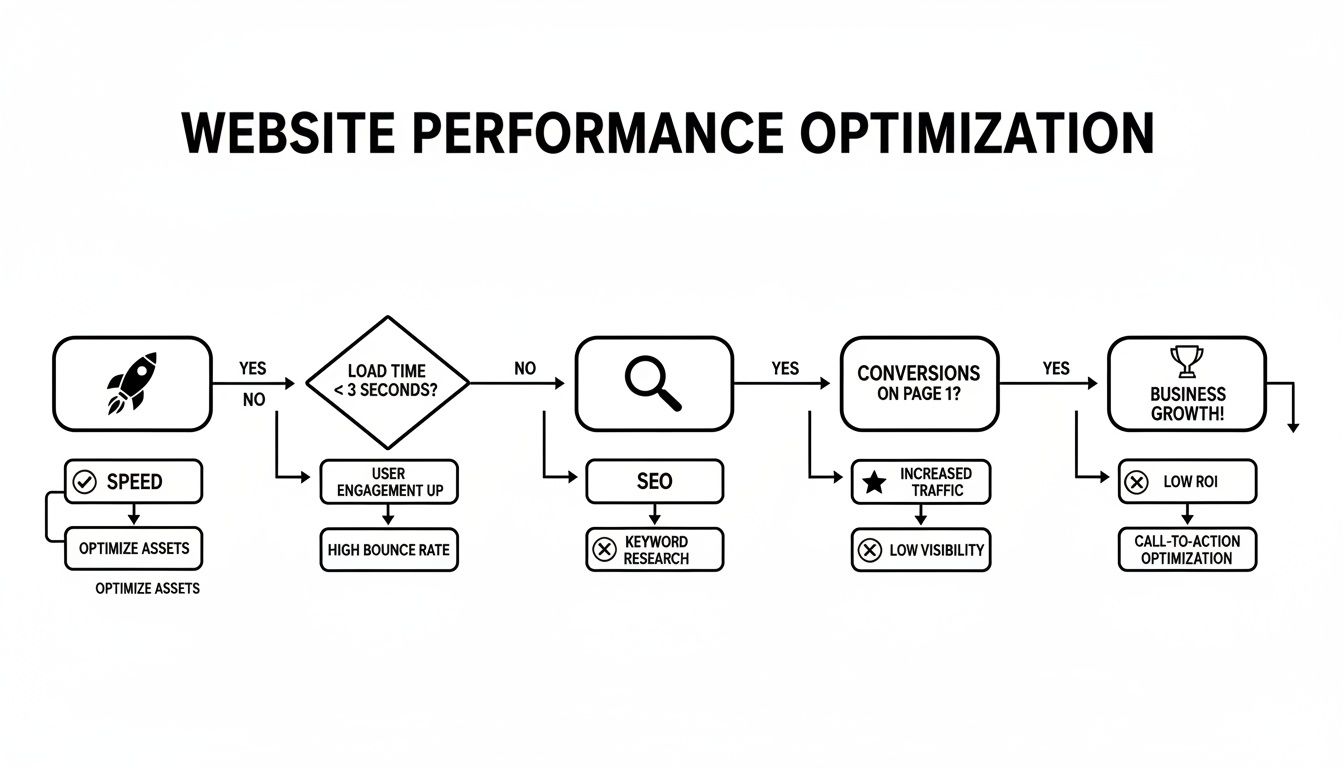
It’s a simple but powerful flow: a well-maintained site delivers a better user experience, which directly boosts your SEO and improves your conversion rates.
Comparing Plan Tiers Side-by-Side
To give you a clearer picture of how these plans differ, we've put together a sample comparison table. Think of this as a template you can use to evaluate what different providers are offering and figure out which tier truly fits your business.
Sample WordPress Maintenance Plan Comparison
| Feature | Basic Plan (e.g., Brochure Site) | Business Plan (e.g., Lead Gen Site) | E-commerce Plan (e.g., Online Store) |
|---|---|---|---|
| WordPress Core & Plugin Updates | Weekly | Weekly (Staging Tested) | Weekly (Staging Tested) |
| Off-Site Backups | Daily | Daily | Real-Time |
| Security Scanning | Weekly Malware Scan | Daily Scan + WAF | Advanced Scan + WAF |
| Performance Optimisation | Basic Cache Setup | Monthly Optimisation | Ongoing Monitoring |
| Uptime Monitoring | Included | Included + Instant Alerts | Included + Instant Alerts |
| Support Response Time | 24-48 Hours | 4-8 Business Hours | 1-2 Hour Priority |
| Hack Cleanup Guarantee | Not Included | Included | Included |
| Monthly Reports | Basic | Detailed | Customised |
Ultimately, choosing the right plan means you’re not overpaying for services you don’t need while also ensuring you aren't under-protecting your most valuable digital asset.
For Perth and Australian businesses looking for a reliable local partner, Webby Website Optimisation offers WordPress help and support plans designed for every business size.
Finding Your Proactive WordPress Partner

Your website needs more than a reactive, break-fix service—it deserves a proactive partner who’s always got your back. Choosing a WordPress website maintenance plan is really about finding an expert who stops problems before they even start. It’s about turning site management from a recurring headache into a real strategic advantage.
Think of it this way: you’re shifting from viewing maintenance as just another business cost to seeing it as a smart investment in your website's stability, security, and future growth.
The right partner won't just tick boxes by updating plugins and running backups. They become a genuine extension of your team, a dedicated guardian for your most important digital asset. They're constantly on the lookout for potential issues, optimising for performance behind the scenes, and keeping you in the loop with clear, consistent communication. You should always feel confident that your site is in safe hands.
Qualities of an Exceptional Maintenance Provider
A truly great maintenance provider stands out by focusing on preventative care, not just swooping in for emergencies. They blend deep technical know-how with a genuine interest in what you're trying to achieve with your business.
So, what should you look for? A partner who ticks these boxes:
- Local Understanding: An Australian-based team, like us here at Webby, gets the local market and is actually awake and available during your business hours. No waiting for someone in a different time zone to wake up.
- Deep WordPress Expertise: They need to know WordPress inside and out. We’re talking about the kind of expertise that handles everything from simple updates to complex troubleshooting without breaking a sweat.
- Proactive Mindset: They should be actively hunting for ways to improve your site’s speed and security, not just sitting around waiting for an alert to pop up.
- Transparent Communication: You should receive clear, jargon-free reports that tell you exactly what’s been done and how your website is performing. No mystery, no confusion.
A proactive maintenance partner acts as your website's primary care physician, not an emergency room surgeon. Their goal is to keep your site healthy through regular check-ups and preventative measures, ensuring you avoid the digital equivalent of a heart attack.
Take the Next Step Towards Peace of Mind
Putting your website on a professional maintenance plan is one of the smartest decisions you can make for your business. It protects your revenue stream, safeguards your hard-earned reputation, and frees you up to focus on what you do best. Instead of constantly reacting to disasters, you can finally move forward with the confidence that your online presence is secure and optimised for success.
Ready to find out how healthy your website really is? At Webby Website Optimisation, we're all about proactive care. Grab a free website health check with our Perth-based experts today. We’ll help you uncover any hidden risks and figure out exactly what your site needs. Let us be the partner that keeps your website working for you, 24/7.
Frequently Asked Questions
When it comes to WordPress website maintenance plans, it’s natural to have a few questions. After all, you’ve got a business to run. We’ve put together some straightforward answers to the questions we hear most often from fellow Australian business owners.
Is a Maintenance Plan Really Necessary for My Small Website?
It’s a common misconception that small websites are safe from hackers, but the reality is quite different. Hackers don't pick and choose based on your company's size; they use automated bots to sniff out any website with a known vulnerability.
Think of a maintenance plan as a very affordable insurance policy. For a small business, a website crash or security breach can be catastrophic, especially with limited resources to fix it. A good plan prevents those costly disasters before they even have a chance to happen, keeping your digital front door open for business.
What’s the Average Cost of a Plan in Australia?
The price really depends on how complex your website is and the level of support you need. Here in Australia, a solid, basic plan covering the essentials—like updates, backups, and security scans—will generally start at around AU$150 per month.
For more demanding sites, such as e-commerce stores or those with high traffic, you’ll likely see comprehensive plans ranging from AU$300 to AU$800+. When you weigh that against the fact that a single hour of downtime could cost your business thousands, a proactive plan starts to look like a bargain.
Can't I Just Do WordPress Maintenance Myself?
You certainly can handle some of the basic updates on your own, but a professional service goes much deeper and is significantly safer. We use advanced security tools that aren't typically available to the public, know how to navigate tricky update conflicts that can break your site, and manage failsafe backups in separate, secure locations.
A professional service does more than just tick boxes. It saves you precious time and brings in the expertise needed to handle any technical curveball, letting you focus on what you do best—running your business.
Essentially, you’re not just paying someone to click 'update'. You're investing in the experience that stops small glitches from snowballing into business-crippling emergencies.
How Often Does My Website Need Maintenance?
A proper maintenance schedule isn't a once-a-month thing; it involves different tasks at different frequencies to keep everything running smoothly. A typical professional routine looks something like this:
- Daily: A complete backup of your entire website (both files and the database).
- Weekly: Checking for and applying all WordPress core, theme, and plugin updates, followed by thorough security scans.
- Monthly: Running performance checks and cleaning up the database to ensure the site stays quick and responsive.
A professional plan automates this whole process, ensuring nothing ever slips through the cracks. While these questions cover WordPress specifically, you might also find some helpful answers in these general platform FAQs about technology services.
Your website is one of your most valuable assets—it’s too important to leave to chance. Here at Webby Website Optimisation, our Perth-based experts deliver proactive, reliable maintenance plans that keep your site secure, fast, and always online. Explore our WordPress help and support plans today and get the peace of mind you deserve.