
At its core, a WordPress speed optimisation service is a professional engagement where experts dig into your website to find and fix whatever is slowing it down. The goal is simple: make your site load as fast as humanly possible for every single visitor. This isn't just about flicking a switch on a plugin; it's a comprehensive technical overhaul to improve user experience, boost your search engine rankings, and ultimately, grow your business.
Why a Fast Website Is Your Most Valuable Business Asset
Imagine your WordPress website is your physical shopfront. You could have the most beautiful displays and amazing products, but what if the front door is stuck? That's exactly what a slow website is. When a potential customer clicks on your link, they expect to walk right in. A page that takes ages to load is like making them wait in a long queue outside a messy, unwelcoming entrance. Most people won't wait; they'll just leave and go to the competitor next door.
In the online world, patience is in short supply. Every extra millisecond a visitor has to wait chips away at their goodwill and directly affects your bottom line. Study after study confirms a clear link between how fast your site loads and how successful your business is. The longer it takes, the higher your bounce rate—that's the percentage of people who give up and leave after seeing just one page.
The Tangible Cost of a Slow Website
This isn't just a small frustration; it's a genuine business problem with real financial consequences. For an e-commerce site, even a one-second delay can cause a 7% drop in conversions. If your business makes $100,000 a day, that single second could cost you over $2.5 million a year. The fallout is immediate and damaging:
- Abandoned Shopping Carts: Slow checkout pages are a primary reason customers get fed up and buy from a competitor with a faster, smoother process.
- Plummeting Search Rankings: Google explicitly uses site speed metrics, known as Core Web Vitals, to help decide its search rankings. A slow site gets pushed down the results, making you invisible to new customers.
- Damaged Brand Perception: A clunky, unresponsive website just feels unprofessional. It suggests you don't care about the details, which quickly erodes customer trust in your brand.
A fast website isn't a 'nice-to-have'. Understanding why website speed is important for SEO shows it's a cornerstone of your entire business strategy, influencing everything from search visibility to brand perception.
Shifting from Expense to Investment
Because of this direct link to revenue and visibility, paying for professional wordpress speed optimisation services shouldn't be seen as a cost. It's a strategic investment in your customer experience, your ability to generate leads, and the credibility of your brand.
A specialist does more than just make your site feel a bit quicker. They re-engineer its performance from the ground up to recover sales you were losing, improve your position in search results, and create a better first impression. When you prioritise speed, you're investing directly in the growth and profitability of your business. That investment pays you back with higher conversion rates, better rankings, and a much healthier bottom line.
What a Professional WordPress Speed Service Actually Delivers
Anyone can tell you to "just install a caching plugin," but that barely scratches the surface of what true professional WordPress speed optimisation services are all about.
Think of it like getting your car serviced. You can top up the oil and check the tyres yourself, but a master mechanic will tune the engine, balance the wheels, and inspect every component to unlock its full potential. A specialist applies that same meticulous, multi-layered approach to your website. It's not a single fix; it's a series of expert interventions designed to work in perfect harmony.
The whole process starts with a deep dive under the bonnet of your website. This initial audit pinpoints every single bottleneck, from sluggish database queries to massive, unoptimised images, creating a data-driven roadmap for everything that follows.
The Foundation: A Comprehensive Performance Audit
Before touching a single line of code, an expert needs to understand why your site is slow. This goes way beyond running a quick test on a public tool. A professional audit is a forensic investigation into your site's performance, examining everything from the server hardware right up to what happens in your visitor's browser.
This diagnostic phase usually involves:
- Waterfall Analysis: Breaking down the loading sequence of every single file—images, scripts, and stylesheets—to see exactly what's loading and in what order. This immediately reveals render-blocking resources that stop your page from appearing.
- Server Response Time Measurement: Checking how quickly your hosting server even responds to the first request. A slow server is like a weak foundation; nothing you build on top of it will ever be truly fast.
- Database Query Profiling: Uncovering slow or clunky queries that force WordPress to wait for data. This is often a hidden culprit behind backend slowness, especially on e-commerce or membership sites.
The diagram below shows how these seemingly small technical issues quickly spiral into real business problems, turning a slow site into lost revenue and poor search visibility.
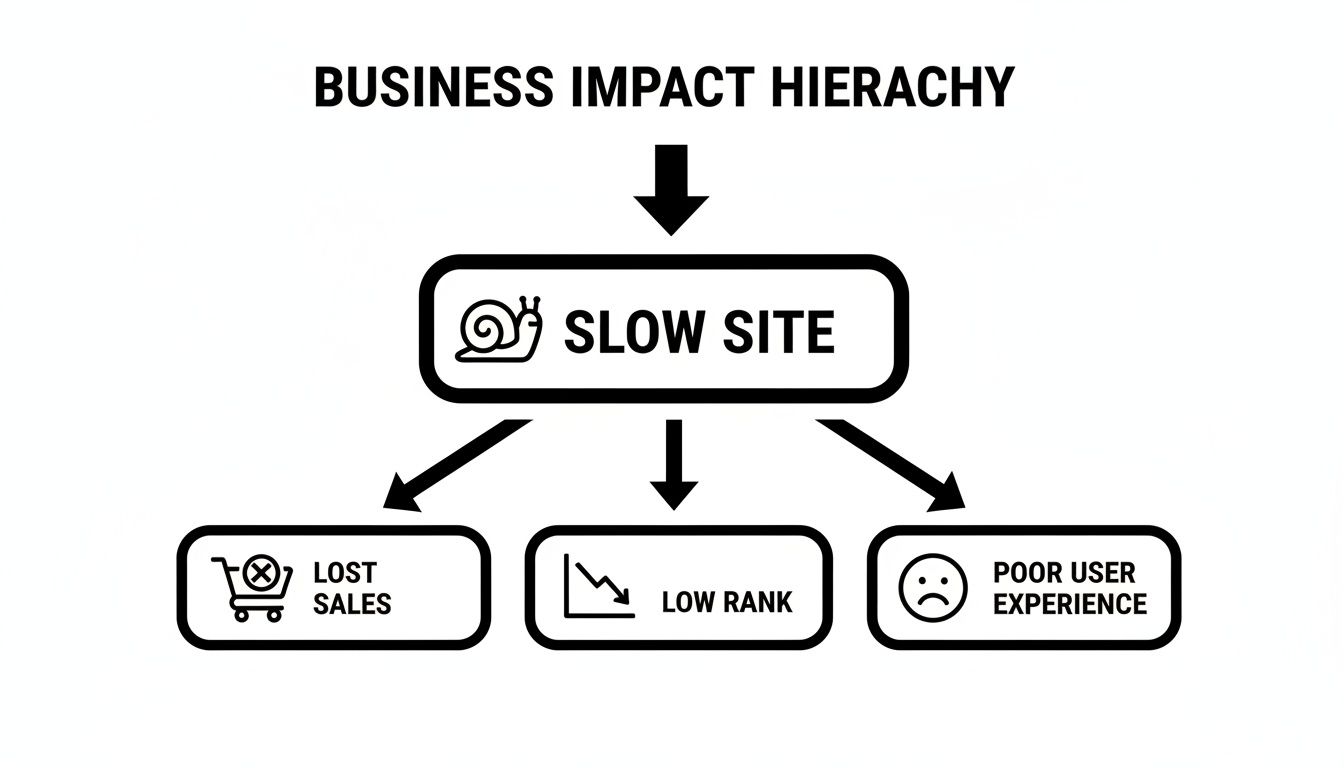
This hierarchy makes it clear: poor technical performance isn't just a developer's problem; it’s a direct threat to your sales and marketing efforts.
Core Technical Optimisation Tasks
With the audit complete, the hands-on work begins. This is where real expertise shines, as a professional service goes far beyond what any single plugin can achieve. They roll out a suite of coordinated fixes that tackle the root causes of poor performance head-on.
A good provider will combine several key strategies to get your site humming. Here's a quick look at what that typically includes.
| Service Component | What It Involves | Primary Business Benefit |
|---|---|---|
| Advanced Caching | Configuring server, browser, and object caching. | Dramatically faster load times for repeat visitors and reduced server strain. |
| Code & Database Cleanup | Minifying CSS/JS, cleaning the database, and removing unused assets. | A lighter, more efficient site that responds quicker to every user request. |
| Image & Media Tuning | Compressing images, converting to WebP, and implementing lazy loading. | Faster visual loading and a better Core Web Vitals score. |
| CDN Integration | Setting up a Content Delivery Network with servers close to your users. | Significantly reduced latency for a global or national audience. |
Each of these elements plays a critical role in building a fast, responsive, and reliable website that supports your business goals.
Advanced Caching Configuration
Caching creates a super-fast, pre-built version of your site to serve visitors, so the server doesn't have to build pages from scratch every single time. A specialist will:
- Configure server-side caching to slash the processing load on your hosting.
- Implement browser caching, which tells a visitor's browser to save files locally, making repeat visits feel almost instant.
- Set up object caching for sites with heavy database operations.
Simply installing a caching plugin without configuring it properly can sometimes make a site slower or even break it. Professional setup ensures the caching strategy is perfectly matched to your site's unique needs and hosting environment.
Meticulous Code and Database Cleanup
Over time, WordPress sites accumulate digital junk. Bloated themes, outdated plugins, and a messy database all add unnecessary weight. A professional service will get in there and:
- Minify Code: Strip out all the useless characters (like spaces and comments) from CSS and JavaScript files to make them smaller and faster to download.
- Optimise the Database: Clean out old post revisions, spam comments, and other gunk that bloats your database and slows down queries. For more on this, check out our guide on the WordPress best practices checklist.
- Remove Unused Assets: Stop scripts and styles from plugins loading on pages where they aren't even needed, cutting out a huge amount of redundant code.
Fine-Tuning Assets for Australian Users
For businesses targeting an Aussie audience, geography matters. A smart optimisation service will focus on getting your content to local users as fast as humanly possible.
Image and Media Optimisation
Massive, uncompressed images are one of the most common speed killers. Professionals don't just squash images; they modernise them. This includes converting images to next-gen formats like WebP, which delivers amazing quality at a much smaller file size. They also implement lazy loading, which smartly defers loading images until they are about to scroll into view.
Content Delivery Network Integration
A Content Delivery Network (CDN) is a game-changer. It's a network of servers spread across the globe. When a user in Melbourne visits your site, a CDN serves assets like images and scripts from a server in Sydney—not from your original server that might be in the US. This massively reduces latency and speeds up load times for your local Australian customers, giving them a snappy experience no matter where they are.
The Real-World ROI of a Faster WordPress Site
Let's be blunt: investing in professional WordPress speed optimisation services isn't just about tweaking code or getting a better score on a testing tool. It's a direct investment in your bottom line. Every millisecond you can shave off your load time has a real, measurable impact on your business. We're talking about more conversions, better Google rankings, and getting more bang for your buck from your marketing spend.
Think about it from your customer's perspective. When they land on your site, you have a tiny window—just a few seconds—to win them over. A slow, clunky experience is an instant turn-off. It tells them you don't care about their time, and most will simply leave before they've even seen what you have to offer. That "bounce" isn't just a lost visitor; it’s a lost sale, a lost lead, and a missed chance to build your brand.
This hits particularly hard in competitive markets. We worked with a retail client in the thick of the Sydney market whose e-commerce site was taking over 6 seconds to load. Their online sales had plummeted as frustrated shoppers gave up and went elsewhere. It’s a harsh reminder of how speed can make or break an Australian business, especially when you consider that 53% of mobile users will ditch a site that takes longer than 3 seconds to load. That’s a massive chunk of potential customers walking away.
Boosting Conversions and Slashing Bounce Rates
Without a doubt, the most powerful benefit of a faster website is the immediate lift it gives your conversion rate. When pages load instantly and the checkout is smooth, customers are simply far more likely to follow through and complete their purchase.
Every one-second delay in page load time can cause a 7% drop in conversions. For an online store doing decent revenue, that single second could be costing you thousands of dollars in lost sales every single week.
Speed doesn’t just help close sales; it keeps people on your site in the first place. A fast, responsive experience dramatically lowers your bounce rate. This means more visitors stick around to explore your products, read your blog posts, or fill out a contact form. That extra engagement is a huge signal to Google that your site offers a quality experience, which is a major win for your SEO.
Dominating Search Rankings with Core Web Vitals
Speaking of SEO, Google now directly measures user experience with a set of metrics called Core Web Vitals. These technical-sounding terms—Largest Contentful Paint (LCP), First Input Delay (FID), and Cumulative Layout Shift (CLS)—are all about how quickly and smoothly your site loads for a real person. A slow site with poor Core Web Vitals is going to have a tough time ranking, no matter how fantastic the content is.
Professional optimisation is all about nailing these metrics. By getting your Core Web Vitals into the green, you gain a serious competitive advantage in search results. A better ranking means more organic traffic, greater brand visibility, and a steady stream of new customers finding you without you having to pay for every single click.
Maximising Your Paid Advertising Spend
If you're running Google Ads or other paid campaigns, a slow landing page is like setting fire to your marketing budget. You’re paying for the click, but the visitor bails before your page even finishes loading. You've lost the money and the lead.
This also directly hurts your campaign performance. Google rewards advertisers who provide a great user experience with a higher Ad Quality Score. A fast-loading, relevant landing page is a key part of that score, and a good one can lead to:
- Lower Cost-Per-Click (CPC): You end up paying less for each visitor.
- Better Ad Positions: Your ads get shown more often and in better spots.
- Higher Conversion Rates: More of your ad spend actually turns into revenue.
By making sure your landing pages are lightning-fast, you make every dollar in your ad budget work harder, dramatically improving your return on investment. We've seen these gains first-hand with our clients, as you can see in the case study on the Bib & Tucker website speed increase we delivered.
How to Measure and Verify Performance Gains
After an optimisation expert has worked their magic, your website will probably feel faster. But feelings aren't data. To truly know you've gotten your money's worth from a WordPress speed optimisation service, you need cold, hard numbers.
Thankfully, there are fantastic tools that give you exactly that. They don't just spit out a single score; they break down your site's performance against the very metrics Google and your customers care about. The two industry-standard tools for this are Google's own PageSpeed Insights and GTmetrix. They provide the clear "before and after" pictures that prove the work was a success.
Understanding the Key Performance Tools
When you run a test, you'll see a dashboard full of different scores and metrics. A good provider will always talk you through these results, but it’s incredibly helpful to understand what they mean for yourself. Think of these tools like a dyno test for a car—they measure raw performance in a controlled environment, cutting through any guesswork.
The main goal? To see a dramatic improvement in your site's scores and, most importantly, to pass Google's Core Web Vitals assessment. This is a critical benchmark for both user experience and your SEO rankings.
Demystifying Core Web Vitals
So, what are these Core Web Vitals? They’re a set of specific metrics Google created to measure the real-world experience a visitor has on your site. They aren't just technical jargon; they directly translate to how fast and stable your site feels to a human being.
- Largest Contentful Paint (LCP): This is all about loading speed. It measures how long it takes for the biggest visual piece of your page—like a banner image or a large text block—to appear. A great LCP is under 2.5 seconds and tells people your site is actually loading, not stuck.
- Interaction to Next Paint (INP): This measures responsiveness. When someone clicks a button or opens a menu, how long does it take for something to happen? A low INP means your site feels snappy and interactive, not laggy.
- Cumulative Layout Shift (CLS): You know when you try to tap a button, but an ad suddenly loads and pushes it down the page? That's layout shift. CLS measures how much your content unexpectedly moves around, which is a massive source of frustration for users.
A "pass" on Core Web Vitals isn't just a nice-to-have for SEO anymore—it's practically a requirement. It’s a direct signal to Google that your website offers a great user experience, and Google rewards that heavily in search results.
From One-Off Fix to Ongoing Monitoring
Getting a fantastic performance score is a brilliant start, but the job isn't done. Your website is a living thing. Every new blog post, plugin update, or even a small content change can introduce new slowdowns.
That’s why ongoing monitoring is crucial. A one-time fix can be completely undone by one bad plugin a few months down the track. A proper speed optimisation service includes regular performance checks to spot these problems before they affect your users and your sales. A comprehensive website audit is the best place to start to understand what this involves.
To keep your site running at peak performance, it’s worth exploring the best website performance monitoring tools. These can automate the checks and alert you if your scores drop, ensuring your site stays fast long after the initial optimisation. It’s a proactive approach that protects your investment and keeps your user experience top-notch.
Choosing the Right Speed Optimisation Partner
Picking the right partner to handle your WordPress speed optimisation services is a massive decision for your business. The market is flooded with options, but the skill levels and approaches can be worlds apart. If you get it wrong, you’re not just out of pocket; you could end up with a site that’s just as slow—or even worse—than when you started.
The trick is to learn the difference between a simple "plugin installer" and a genuine performance specialist. A true expert won’t just slap on a generic, one-size-fits-all solution. They act more like a technical partner, getting their hands dirty by diving deep into your site's unique setup to deliver real, lasting improvements that actually help you hit your business goals.
Digging Deeper Than Surface-Level Fixes
One of the most common traps businesses fall into is hiring someone who just installs a couple of popular speed plugins and calls it a day. While tools like caching plugins are definitely part of the puzzle, they are by no means the whole solution. Real optimisation is a much more technical process that demands a solid understanding of how WordPress, servers, and web browsers all talk to each other.
A specialist’s approach will always involve custom work. This means they’ll be sifting through inefficient code in your theme or plugins, cleaning up your database queries, and tweaking your server settings for maximum performance. Their approach is forensic; they hunt down the root causes of the slowness instead of just masking the symptoms. That’s the real difference between a band-aid fix and a proper performance overhaul.
Essential Questions for Potential Partners
To find a provider who can actually deliver the goods, you need to ask the right questions. Use this checklist to properly vet any potential partners and make sure they’ve got the expertise your website deserves.
What is your specific methodology? Get them to walk you through their process from start to finish. Do they kick off with a proper audit? Do they actually analyse your code, or do they just flick some switches in a plugin? A detailed, step-by-step plan is a huge green flag.
Can you show me before-and-after reports for past clients? Any service worth its salt will have case studies with real, verifiable data from tools like GTmetrix or Google PageSpeed Insights. You want to see clear proof of improved Core Web Vitals and faster load times.
Do you have experience with Australian hosting environments? A partner who knows their way around local hosts and data centres in places like Sydney and Melbourne will understand how to minimise latency for your Aussie customers. That local knowledge is gold.
How do you handle reporting and communication? This is non-negotiable. Your provider should give you clear, easy-to-digest reports explaining exactly what they did and the impact it had. You should never be left guessing about the work being done on your site.
Evaluating Service Models and Support
Finally, think about how the service is structured. Is it a one-off project or an ongoing maintenance plan? A one-time speed-up can give you a fantastic initial boost, but websites naturally slow down over time as you add new content, plugins, and features.
A one-time fix is a great start, but performance requires ongoing attention. The best partners offer maintenance plans that include continuous monitoring, ensuring your site remains fast and secure long-term, protecting your initial investment.
This ongoing support is what separates the good from the great. Performance is tightly linked to security and regular updates. A partner offering a complete service—speed, security, and maintenance rolled into one—provides far more value in the long run.
For instance, we've seen Melbourne e-commerce businesses boost their conversion rates by a staggering 25-70% simply by slashing load times on local servers. This wasn't achieved with a one-off tweak; it was the result of ongoing support that included daily backups and security scans, ensuring the site was always online and always fast. You can learn more about how local businesses are getting these results on this detailed WordPress speed optimisation resource.
Choosing a partner who sees performance as a continuous process means you're choosing someone who is invested in your long-term success.
Got Questions About WordPress Speed Optimisation?
Diving into professional WordPress speed optimisation services usually brings up a few practical questions. You get the 'why' and the 'how', but now it's about the real-world details that matter to a business owner. Let's tackle the most common queries we hear, so you can make a decision with complete confidence.
How Much Do WordPress Speed Optimisation Services Cost in Australia?
The investment for professional WordPress speed optimisation in Australia really depends on how complex your website is. For a more straightforward business or brochure website, you're likely looking at a one-off project that could range from a few hundred to over a thousand dollars.
But for bigger, more complicated sites—think e-commerce stores with thousands of products or membership sites with heavy database traffic—the cost is naturally higher. These sites simply have more moving parts that can cause slowdowns, which means the work required is far more detailed and technical.
A lot of specialist providers, including us, bundle optimisation into a monthly maintenance plan. Honestly, this is often the most cost-effective way to go in the long run. Instead of a big upfront fee, you get continuous monitoring, security, and performance tweaks. This keeps your site fast month after month, not just for a little while after a single fix. It’s better to see it as an ongoing investment in your online revenue, not just a one-off tech spend.
Can I Just Use a Caching Plugin to Speed Up My Site?
Installing a top-notch caching plugin like WP Rocket is a fantastic first step, but it's rarely the whole solution. Professional optimisation goes much, much deeper, tackling the root causes of slowness that a plugin simply can't reach.
Think of it this way: a plugin can help serve your pages faster, but it can't fix the underlying problems that made them slow to build in the first place.
A specialist will definitely configure a caching plugin perfectly for your server—a crucial step many people get wrong. But more importantly, they'll fix the core issues:
- Massive Images: They’ll compress your existing images and switch them to modern, faster formats like WebP.
- Messy Code: They’ll minify your CSS and JavaScript files and stop scripts from loading on pages where they aren’t even used.
- Bloated Database: They'll clean out old, junk data and optimise the database queries that are dragging your backend down.
- Slow Hosting: They'll pinpoint if your server is the real bottleneck and recommend a better hosting solution.
Relying only on a caching plugin is like putting a high-performance exhaust on a car with a struggling engine. It might sound a bit better, but it doesn't fix the fundamental problem. A comprehensive service tunes the entire engine for peak performance.
How Quickly Will I See Results From Speed Optimisation?
You'll see huge, measurable improvements in your site's technical performance metrics almost straight away. Within a few days of the work being done, tools like GTmetrix and Google PageSpeed Insights will show a dramatic jump in load times, performance scores, and Core Web Vitals. These are the instant 'before and after' results that prove the technical side of the job was a success.
However, the real business results—the ones that actually affect your bottom line—take a little longer to show up. It might take Google's search crawlers a few weeks to re-index your site and fully register the improvements to your Core Web Vitals, which can then start to influence your search rankings.
Changes in user behaviour, which you can track in Google Analytics, usually become noticeable within the first month. You should start seeing positive trends in key business metrics like:
- Lower bounce rates
- Longer time on site
- Increased page views
- Higher conversion rates
So, while the technical speed boost is rapid, the full business ROI unfolds over the following weeks and months as both search engines and your customers respond to the much better experience.
Is Speed Optimisation a One-Time Fix or an Ongoing Process?
This is one of the most important questions you can ask, and the answer is crystal clear: performance optimisation is an ongoing process, not a "set it and forget it" task. Think of it like looking after a high-performance car. A major service gives it a massive boost, but you still need regular tune-ups to keep it running smoothly.
Your WordPress site is a living, breathing thing. Every new plugin you add, every WordPress update, and every new blog post or high-res image can potentially create new performance problems and slow your site right back down.
This is exactly why ongoing performance monitoring is so critical. A fantastic one-time fix can be completely undone by a single badly coded plugin update six months down the track. A dedicated service provider will proactively manage all of this for you. They’ll watch for any performance dips, make continuous adjustments, and ensure your site is always running at its absolute best. This approach protects your initial investment and guarantees long-term results, making sure your website remains a fast, reliable asset for your business.
At Webby Website Optimisation, we provide comprehensive WordPress support and maintenance plans that keep your site fast, secure, and up-to-date. If you're ready to invest in a website that delivers a superior user experience and drives real business growth, we're here to help. Explore our services to see how we can become your trusted WordPress partner.
Learn more about our WordPress Help & Support services.